How to Integrate AI Into Existing Systems: A Practical Guide for 2027
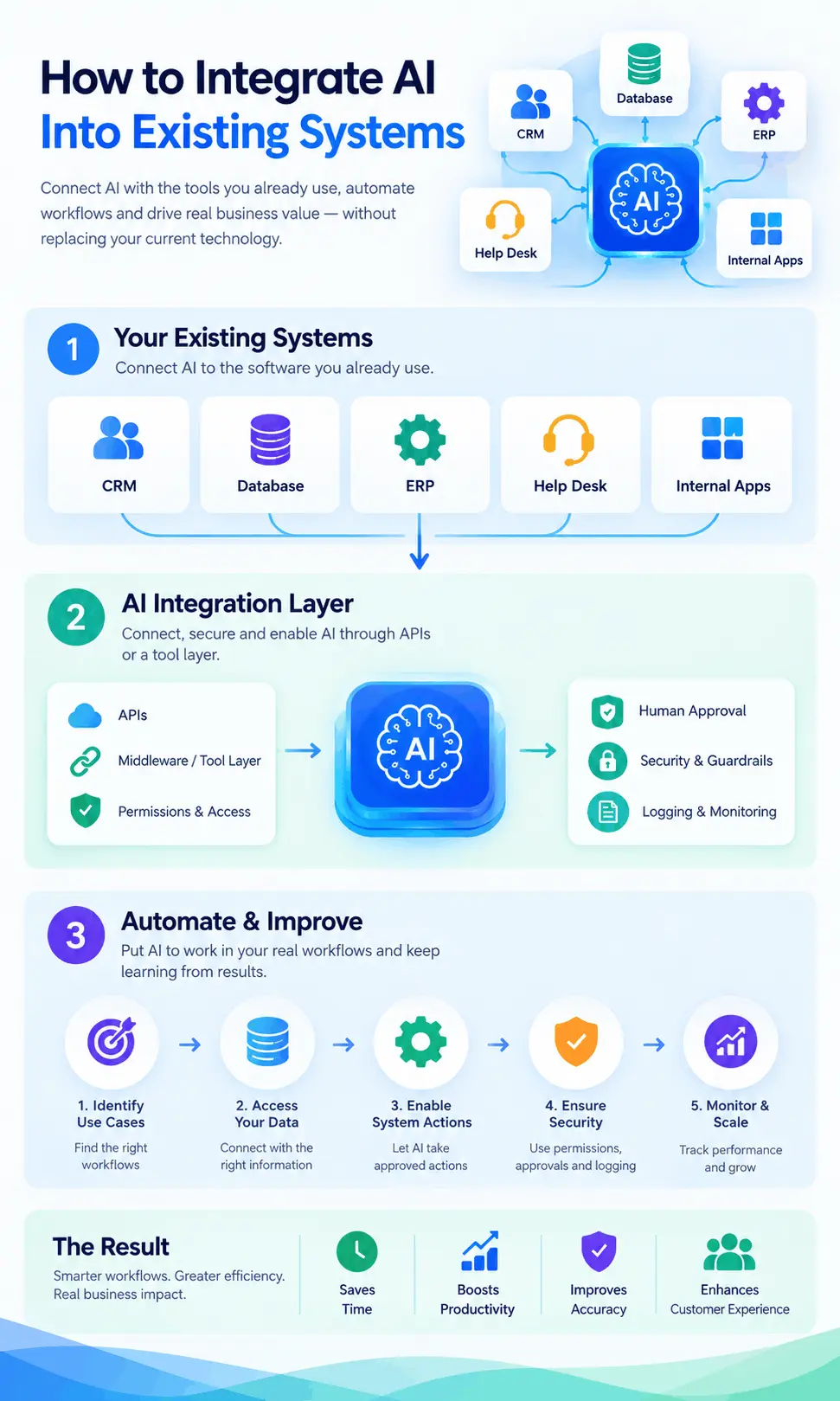
To integrate AI into existing systems, you connect an AI model to the software your team already uses, such as your CRM, ERP, help desk or database, through APIs or a tool layer, with clear permissions and human approval for risky actions. You don't need to replace those systems. Start with one workflow, prove it works, then expand.
That's the short version. The rest of this guide covers what AI integration services actually include, where AI fits in a business, the main integration methods, a step-by-step process, real projects we've delivered, security, cost drivers and how to choose a partner.
It's written for business owners, CTOs and operations managers who have already decided to use AI and now need it to work inside daily operations, not in a separate browser tab.
What are AI integration services?
AI integration services connect AI models, AI agents and automation to the software a business already runs, such as its CRM, ERP, help desk, databases and internal apps. The goal is for AI to read the right data, take approved actions and log what it did, inside existing workflows instead of a separate tool.
In practice, that work usually covers five things:
- Use-case selection: finding the workflows where AI saves real time or money.
- Data access: connecting the model to the records and documents it needs, with the same access rules your staff follow.
- System actions: letting AI create a ticket, update a CRM field or book a meeting through your existing APIs.
- Guardrails: permissions, human approval steps, logging and protection against bad inputs.
- Run and improve: monitoring quality, cost and failures after launch, and testing model updates before they reach users.
If you want the service view of this, our AI integration services page lists exactly what we connect and how.
AI integration vs AI development: what's the difference?
AI integration connects existing AI models to your current systems and workflows. AI development builds new AI capability, such as a custom model, a retrieval system or a multi-agent platform. Most business projects need mostly integration with some development, because the model is rarely the hard part. The connections around it are.
| AI integration | AI development | |
|---|---|---|
| Main goal | Make AI work inside current systems | Build new AI capability |
| Typical work | APIs, data connections, permissions, workflow changes | Model selection or training, retrieval pipelines, agent logic, evaluation |
| Starting point | Your CRM, ERP, help desk, apps | A problem no existing tool solves well |
| Who it suits | Teams that want AI in daily operations fast | Teams building an AI product or a deep internal capability |
| Main risk | Weak data access or no human checkpoints | Building something that never reaches users |
Many projects blend both. A support assistant, for example, may integrate a provider model with your help desk (integration) and add a retrieval system over your knowledge base (development).
Why do so many AI projects stall before production?
Most AI projects stall because the AI is never properly connected to the systems, data and people it depends on. A demo works on sample data in a chat window. Production needs live data access, permissions, error handling, logging and an owner, and those are integration problems, not model problems.
MIT's Project NANDA put a number on this in its 2025 report, The GenAI Divide: State of AI in Business 2025, which found that most organizations in its research saw no measurable P&L return from generative AI. Coverage of the report notes it was a preliminary study with a limited sample, so treat the headline figure with care. The lead author's explanation is still useful: enterprise AI needs careful integration into existing systems, and without it pilots rarely scale.
From our own delivery work, these are the integration gaps we see most often when a pilot stalls:
- No system access. The assistant can talk, but it can't read the CRM record or create the ticket, so staff still copy and paste.
- No permission model. Security teams block rollout because the AI could see data the user is not allowed to see.
- No logging. Nobody can tell what the AI did or why, so managers won't trust it.
- No owner. The pilot belonged to an innovation team, and no department took it on.
- Scope too wide. "AI for the whole company" instead of one workflow with a clear success measure.
Every one of these is fixed by engineering and process, not by switching to a newer model.
Do you need to replace your CRM or ERP to use AI?
No. In most cases you keep your CRM, ERP and help desk as the systems of record and connect AI to them through their APIs. The AI reads data, suggests or takes approved actions, and writes results back. Replacement is only worth considering when a system has no API and no export at all.
Your existing systems already hold years of customer history, orders, tickets and documents. That data is what makes AI useful for your business specifically. Throwing it away to adopt an "AI-native" platform usually costs more than connecting what you have.
The one real exception is a legacy system with no API, no database access and no reliable export. Even then, the usual answer is a small integration layer or a partial modernization of the parts AI needs, not a full rebuild.
Where can AI be integrated in a business?
AI can be integrated anywhere a process involves reading, writing, sorting or deciding on information: CRM and sales, ERP and finance, help desk and customer service, internal documents and knowledge, and your own software products. The best first targets are high-volume, repetitive workflows where a mistake is easy to catch.
CRM and sales
This is where most companies start, because the payoff is visible fast. Integrating AI with a CRM such as HubSpot or a custom CRM can:
- Summarize calls and emails and log them to the right contact.
- Propose field updates and next steps for a rep to approve.
- Score and route new leads based on your own rules.
- Draft follow-ups in your team's tone for a person to review.
- Contact new leads by voice or SMS and book a confirmed appointment.
The key word is propose. In a well-built CRM integration, AI prepares the work and a person approves anything that changes a deal or goes to a customer, at least until the output has earned trust.
ERP, finance and reporting
ERP systems are good at recording what already happened. AI connected to the ERP and data warehouse can pull figures, write the weekly analysis and flag exceptions, such as invoices that don't match purchase orders or stock that is trending toward a shortage.
Role-based access matters more here than anywhere. A finance assistant should only see what that department is allowed to see. Our data and analytics work usually comes first on ERP projects, because AI is only as good as the data it can reach.
Help desk and customer service
AI integrated with a help desk such as Zendesk or Jira can answer common questions from approved content, draft replies for agents, triage tickets by topic and urgency, and hand off to a person with the full conversation attached.
For phone channels, the same idea extends to AI voice agents that answer, qualify and route calls, with every interaction logged to the CRM.
Documents and internal knowledge
Policies, contracts, manuals and support history can become searchable in plain language. Retrieval-augmented generation (RAG) is a method where the AI first retrieves the relevant passages from your own documents, then answers using only those passages and links to them. That source link is what lets a professional check the answer instead of trusting it blindly. Our RAG development page goes deeper on this.
Your own software or SaaS product
If you run a custom application or a SaaS platform, AI features can be built directly into it: smart search, document extraction, drafting, recommendations or an in-app assistant. The extra work here is multi-tenant data isolation (one customer's data must never reach another's prompt), usage tracking for cost control and a safe rollout behind feature flags.
What are the main ways to integrate AI into existing systems?
There are five main ways to integrate AI into existing systems: turn on the AI features your vendor already offers, use a no-code connector, build a direct API integration, add a tool layer such as MCP that agents can use, or build a custom AI agent. The right choice depends on how many systems are involved and how much control you need.
| Method | How it works | Best for | Main limitation |
|---|---|---|---|
| Built-in vendor AI | Switch on AI features inside your CRM, help desk or office suite | Quick wins inside one tool | Locked to that vendor; can't span systems |
| No-code connectors | Tools like Zapier or Make pass data between apps and an AI model | Simple, low-volume workflows | Fragile at scale; limited logging and permissions |
| Direct API integration | Custom code connects the AI model to each system's API | One or two core systems, high volume | Each new system means new integration code |
| Tool layer (MCP) | Your systems are exposed as controlled "tools" that any approved agent can call | Several systems, several AI use cases | Needs careful permission design up front |
| Custom AI agent | An agent plans and carries out multi-step work across systems | Complex workflows with judgment calls | Highest build and testing effort |
Most mature setups end up combining two or three of these. A common pattern is vendor AI for simple in-tool tasks, plus a tool layer for anything that crosses systems.
What is MCP and why does it matter for integration?
The Model Context Protocol (MCP) is an open standard that lets AI models and agents use external tools and data sources through one consistent interface. Instead of writing a separate integration for every model and every system, you expose each system once as a set of controlled tools, and approved agents call them.
For a business, the benefit is control. You decide exactly which tools exist (for example, "read contact", "create ticket", "draft invoice"), which roles can use them and which ones need human approval. We use MCP where it fits, and we treat it as one option, not a default for every project. [Verify: confirm MCP's current governance and adoption status before publishing.]
How to integrate AI into existing systems: a 7-step process
To integrate AI into existing systems, pick one workflow, map the systems it touches, check the data, choose the integration method, build with real test cases, validate with the people who do the work, then deploy with monitoring and expand. Each step should end with something you can review before the next one starts.
- Pick one workflow with a clear measure. Choose a process that is frequent, repetitive and easy to check, such as lead follow-up, ticket triage or invoice matching. Write down the measure now: hours saved, response time, error rate or leads contacted.
- Map the workflow with the people who do it. Sit with the team for an hour. List every system they open, every copy-paste, every decision and every exception. The exceptions usually decide the design.
- Check data access and quality. Confirm the AI can reach the records it needs through an API or database, and that key fields are actually filled in. Fix the worst gaps first; AI will not fix messy data for you.
- Choose the integration method and the AI's limits. Decide which method from the table above fits, which model to use, which actions AI may take on its own and which need approval. Write these rules down before any code.
- Build with a test set from day one. Collect 30 to 100 real past cases (anonymized where needed) with the correct outcome for each. Every build is checked against this set, so quality is measured, not guessed.
- Validate with real users. The team runs the system on live work with approval steps on. Track where they edit or reject the AI's output, then adjust prompts, rules or data until it fits daily work.
- Deploy with monitoring, then expand. Release with role-based access, logging, cost tracking and alerts. Once the first workflow proves itself, the same connections and controls make the second one much faster.
The biggest mistake at step one is choosing the most impressive use case instead of the most measurable one. A boring workflow that saves ten hours a week will get funded for phase two. An ambitious one with no clear measure usually won't.
Which parts of a workflow should AI handle, and which should stay rule-based?
AI should handle the steps that need judgment on messy input, such as reading an email, understanding a document or drafting a reply. Everything predictable should stay as ordinary rule-based software: validations, routing rules, approvals, schedules and system updates. This split keeps AI integration reliable and easy to audit.
This is called intelligent process automation: traditional automation plus AI only where a process needs judgment. Here's how the split looks in workflows we build.
| Workflow | What AI handles | What stays rule-based |
|---|---|---|
| Lead follow-up | Conversations by voice and SMS, confirming a time | Contact sequence, calendar booking, CRM updates |
| Document intake | Reading forms, invoices and contracts; extracting fields | Validation, routing, approvals |
| Compliance checks | Comparing content against requirements | Sign-off by a specialist |
| Reporting | Pulling figures and writing the analysis | Schedules, permissions, distribution |
| Support triage | Understanding the request and drafting a reply | Ticket rules, SLAs, escalation |
A useful test: if a step could be written as an "if this, then that" rule, don't give it to a model. Models are slower, cost more per run and are less predictable than plain code. Use them where plain code can't cope.
Real AI integration examples from our projects
The clearest way to see how AI integration works is through projects that are already running. Below are three integrations we've delivered, each connecting AI to a different kind of system: a CRM and phone stack, a data warehouse with Microsoft 365, and a document library.
Zonified Connect: AI connected to a CRM, calendars and phone
The problem: new leads waited for someone to call them back, and evenings and weekends went uncovered.
What we integrated:Zonified Connect is our own AI voice CRM. Voice and SMS agents are connected to HubSpot, Google and Outlook calendars, Vapi and Twilio. They contact each new lead on the business's own sequence, log every conversation to the lead record and book an appointment only after the lead confirms a time.
The design choice that matters: automation stops the moment a person takes over. The business sets the rules; the AI works inside them.
Manufacturing Agent Platform: AI connected to a data warehouse and Microsoft 365
The problem: a precision manufacturer with no in-house AI team wanted department assistants its staff could trust and its own engineers could maintain.
What we integrated: the Manufacturing Agent Platform gives nine departments their own assistants, built from ninety narrowly scoped subagents, connected to the company's enterprise data warehouse and Microsoft 365. Access is role-based and matched to each department's data.
The design choice that matters: each assistant was validated against real scenarios by the staff who use it, and the client's own team maintains the platform after handover.
Insurance Claims RAG Assistant: AI connected to policy and claims documents
The problem: claims professionals searched scattered files to answer coverage questions.
What we integrated: the Insurance Claims RAG Assistant answers in plain language over policy and claims documentation, built on PostgreSQL with pgvector.
The design choice that matters: every answer links to the exact policy clause it came from, so a professional checks the source instead of trusting a summary. Retrieval quality is monitored in production.
Other projects follow the same pattern. LabelRX checks product labels against FDA and industry requirements and shows the specific requirement behind each finding. SparkUp AI is an AI workflow automation marketplace with a drag-and-drop builder. You can see the full list on our work page.
How do you keep AI integration secure?
You keep AI integration secure by giving AI the same or narrower access than the user it serves, enforcing that in code, limiting which actions it can take, requiring human approval for anything irreversible, logging every request and action, and treating content from emails and documents as data, never as instructions.
These are the controls we build into every integration:
- Permission-aware access: AI only reads data the current user is allowed to see. This is enforced in code, not in a prompt, because prompts can be talked around.
- Least-privilege actions: each agent gets only the tools it needs, with limits on volume and spend.
- Human approval for high-impact steps: sending money, deleting records or emailing customers waits for a person.
- Full logging: every AI request, answer and action is recorded for review and audit.
- Data handling: use model-provider settings that exclude your data from training where offered [verify current provider terms], or deploy inside your own cloud account when data must stay under your control.
- Prompt-injection defense: prompt injection is an attack where hidden instructions inside an email, file or web page try to make the AI do something it shouldn't. Treating all outside content as data, plus the approval gates above, contains it.
- Monitoring after launch: track accuracy, cost and failures, and test model updates before switching users over.
Regulated industries add their own rules on top, such as HIPAA for US healthcare data. Confirm your compliance requirements with your legal team before connecting AI to regulated records.
How much does AI integration cost?
AI integration cost depends on the number of systems connected, the state of your data, how much autonomy the AI has, your security and compliance needs, and ongoing model usage. A single-workflow integration with one or two systems costs far less than a multi-department agent platform. Budget for both the build and monthly running costs.
We don't publish fixed prices because scope varies too much. Instead, here are the factors that move the number most, so you can estimate where your project sits.
| Cost driver | Lower cost | Higher cost |
|---|---|---|
| Systems connected | One system with a modern API | Several systems, including legacy ones with no API |
| Data readiness | Clean, structured, accessible | Scattered, inconsistent, needs pipelines first |
| AI autonomy | Drafts and suggestions for a person to approve | Multi-step agent actions across systems |
| Compliance | Internal, non-sensitive data | Regulated data (health, finance, insurance) |
| Volume | Low to moderate daily runs | High-volume, real-time (voice, live chat) |
| Running costs | Small model-usage bill | Large token, telephony and hosting bills |
Typical ranges: single-workflow integration [placeholder: $ range], multi-system integration [placeholder: $ range], monthly run cost [placeholder: $ range]. Only fill these with figures from our own recent proposals.
How long does AI integration take?
A focused integration of one workflow with one or two systems usually takes weeks, not months [verify: our typical range, e.g. placeholder weeks]. Multi-system or multi-department projects take longer and are best delivered in phases, with the first workflow live before the next starts. Data clean-up and security review are the steps that most often extend timelines.
How do you choose an AI integration partner?
Choose an AI integration partner that has shipped integrations into real business systems, can show you how they handle permissions and approvals, starts with one measurable workflow, and hands you ownership of the code, prompts and test sets. Be wary of partners who lead with the model name instead of your workflow.
Use this checklist on your calls:
- ☐ Can they show published case studies naming the systems they connected?
- ☐ Do they ask about your workflow and data before recommending a model?
- ☐ Will they explain which actions AI takes alone and which need approval?
- ☐ Is permission-aware data access enforced in code?
- ☐ Do they build a test set of real cases and report quality against it?
- ☐ Do they monitor cost, accuracy and failures after launch?
- ☐ Do you own the code, prompts, test sets and cloud accounts?
- ☐ Do they have software engineers, not only prompt specialists? Integration is software work.
- ☐ Can they work as a fixed-scope project or as a dedicated team, depending on your needs?
If a partner can't answer the permission and logging questions clearly, the project will likely stall at your security review.
Is your business ready? A quick readiness checklist
Your business is ready for AI integration if you can name one repetitive workflow, the systems it touches have APIs or database access, the key data is reasonably clean, and someone in the business will own the result. You don't need an in-house AI team.
- ☐ We can name one workflow that eats hours every week.
- ☐ We know how we'd measure success for it.
- ☐ The systems involved have an API, a database we can query or a reliable export.
- ☐ The data the workflow uses is mostly complete and consistent.
- ☐ A manager will own the workflow after launch.
- ☐ Staff who do the work today can spare a few hours to test it.
- ☐ We know which data is sensitive or regulated.
Five or more ticks means you can start. Fewer usually means a short data or process fix comes first. If you're also planning AI agents, our agentic AI strategy guide covers readiness for more autonomous systems.