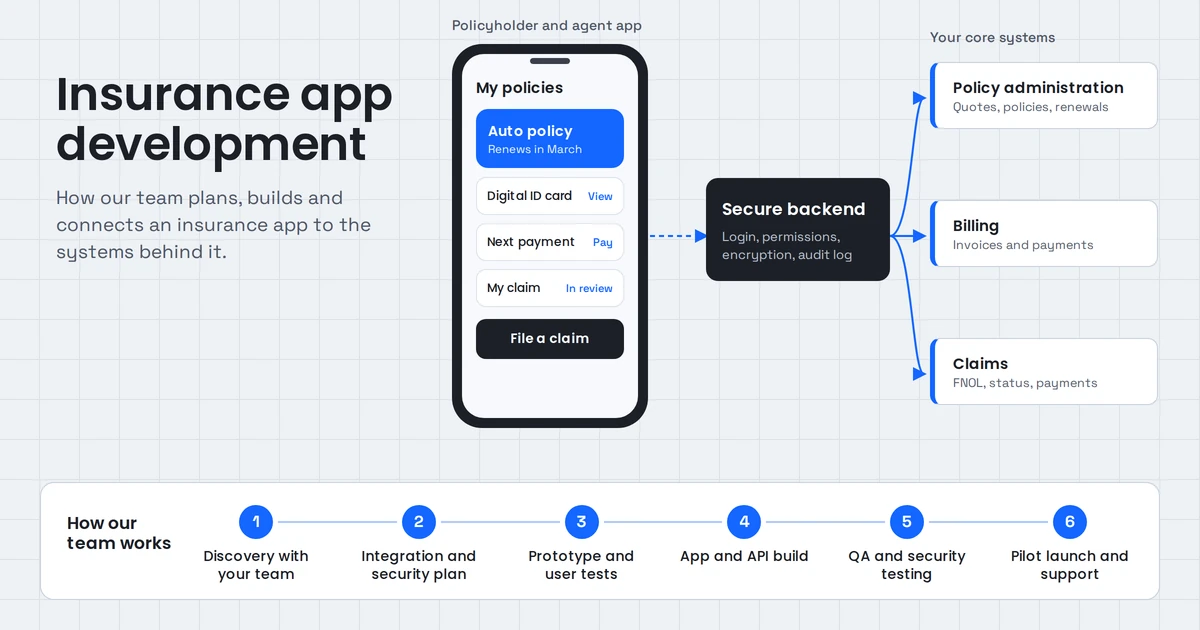
Insurance app development is the process of building mobile and web apps that let policyholders, agents and claims teams buy and manage policies, pay premiums and file or handle claims. A good insurance app connects securely to the policy, billing and claims systems behind it. That connection, not the screen design, is what decides whether the app succeeds.
This guide is for insurance carriers, MGAs, agencies, brokers and insurtech founders planning an app. It covers app types, features by user, core-system integration, US compliance rules, safe use of AI, the build process, cost drivers and how to choose a development partner.
What is insurance app development?
Insurance app development is the design, build and maintenance of software that handles insurance tasks on phones, tablets and the web. It includes customer apps for policies and claims, tools for agents and adjusters, and the integrations that connect those apps to an insurer's core systems for policy administration, billing and claims.
It's a specialized area of software development for three reasons:
- The data is sensitive. Apps handle personal, financial and sometimes health information, so security and privacy rules apply from day one.
- The core systems are old. Many insurers still run policy and claims platforms built decades ago, and the app has to work with them.
- The rules vary by state. In the US, insurance is regulated mainly at the state level, so requirements can change across the states where you sell.
When people say "insurtech software development", they usually mean the same work done by a newer company building digital-first insurance products.
What types of insurance apps can you build?
The main types of insurance apps are policyholder self-service apps, agent and broker apps, claims and adjuster apps, quote-and-buy apps, and line-specific apps for auto, home, health, life or commercial insurance. Many insurers start with a self-service app because it reduces call-center volume quickly.
| App type | Main users | What it does | Best first goal |
|---|---|---|---|
| Policyholder self-service | Customers | View policies and ID cards, pay premiums, file and track claims | Fewer service calls |
| Quote and buy | Prospects | Get a quote, compare options, buy online | More direct sales |
| Agent and broker | Agents, brokers | Manage clients, quotes, renewals and commissions | Less admin per policy |
| Claims and adjuster | Claims staff, field adjusters | Intake, inspections, photos, estimates, approvals | Faster claim cycle |
| Health insurance | Members, providers | Benefits, ID cards, provider search, claims status | Member self-service |
| Auto and usage-based | Drivers | Digital ID cards, roadside help, driving data | Retention and pricing |
| Commercial insurance | Business clients, brokers | Certificates, schedules, multi-location policies | Faster servicing |
You don't need all of them. Pick the one that removes the most manual work or brings in the most revenue, then expand.
What features should an insurance app have?
An insurance app should have secure login, policy details, digital documents and ID cards, premium payments, claims filing with photo upload and status tracking, notifications and in-app support. Agent and claims apps add client management, task queues and approvals. The right feature set depends on who the app is for.
Policyholder features
- Secure sign-in with multi-factor authentication and biometric login.
- Policy summary, coverage details and documents in one place.
- Digital ID cards, including auto ID cards where state law accepts digital proof.
- Premium payments, autopay, payment history and reminders.
- First notice of loss (FNOL), the first report of a claim, with photos, location and a guided form.
- Claim status tracking with clear next steps.
- Policy changes, such as adding a driver or updating an address.
- Chat, call-back requests and a searchable help center.
Agent and broker features
- Client list with policies, renewals and open claims.
- Quoting with the carrier's rating rules.
- Renewal reminders and cross-sell prompts.
- Document collection and e-signature.
- Commission tracking.
- Lead follow-up so new prospects are contacted quickly.
Claims and adjuster features
- Claim intake queue with priority and assignment.
- Field inspection tools: photos, video, notes and offline mode for areas with weak signal.
- Document checklists so files are complete before review.
- Approval steps with limits by role.
- Fraud indicators flagged for human review.
- Payment authorization connected to the claims system.
Admin and back-office features
- Role-based access so each user sees only what they should.
- Audit logs of who viewed or changed what.
- Content management for forms, FAQs and notices without a new app release.
- Analytics on usage, drop-off and claim times.
- Notification rules for renewals, payments and claim updates.
Why do insurance apps fail after launch?
Insurance apps usually fail after launch because they show data customers can't act on, can't complete tasks without a phone call, or show out-of-date information from slow core-system syncs. Low engagement between renewals and weak integration with policy and claims systems are the two most common causes.
A customer who opens an app to file a claim and then has to call anyway won't open it again. The same is true for an agent whose app can't produce a quote. Watch for these warning signs during planning:
- Read-only apps. Customers can see their policy but can't change anything.
- Batch data. Policy or claim status updates once a night, so the app is often wrong.
- Dead ends. Tasks start in the app and finish on the phone.
- No reason to return. The app is only useful once a year at renewal.
- Built for the org chart. Separate apps for each line of business instead of one view of the customer.
Each of these is a design and integration problem. Solving them is cheaper before the build starts than after launch.
How does an insurance app connect to core insurance systems?
An insurance app connects to core insurance systems through APIs or an integration layer that reads and writes policy, billing and claims data. If a core system has modern APIs, the app calls them directly. If it doesn't, an integration layer translates between the old system and the app, so the core platform doesn't need replacing.
Core insurance software usually includes three systems:
- Policy administration system: quotes, policies, endorsements and renewals.
- Billing system: invoices, payments, installments and cancellations for non-payment.
- Claims system: first notice of loss, reserves, payments and claim closure.
Most insurers also run a CRM, a document management system and a data warehouse. The app often needs data from all of them.
The common integration options are:
| Situation | Integration approach | Trade-off |
|---|---|---|
| Core systems have modern APIs | App calls the APIs through a secure backend | Fastest; depends on API coverage |
| Core systems have a database but no API | Build a service layer that exposes the needed data | Extra build work; keep it narrow |
| Core systems only export files | Scheduled sync to an app database | Data can be hours old; label it clearly |
| Several old systems for different lines | One integration layer that combines them | Larger project; gives one customer view |
An important rule: the app should never connect directly from the phone to a core system. All calls should go through your own secure backend, which handles authentication, logging and rate limits.
If your core systems are old, our enterprise software team can modernize only the parts the app depends on, rather than replacing the whole platform.
What compliance rules apply to insurance apps in the US?
US insurance apps must follow state insurance data security laws, federal privacy rules under the Gramm-Leach-Bliley Act, HIPAA for health plans, state privacy and breach-notification laws, accessibility expectations, and payment card security standards. Which rules apply depends on your lines of business and the states where you operate.
The main areas to plan for:
- State insurance data security laws. The NAIC Insurance Data Security Model Law requires licensed insurers and agencies to run an information security program, oversee their vendors and report cybersecurity events. As of March 2026, 28 jurisdictions have adopted the model. New York has its own cybersecurity regulation, 23 NYCRR 500.
- Financial privacy. The Gramm-Leach-Bliley Act sets privacy rules for financial institutions, including insurers, largely enforced through state insurance regulators.
- Health information. Health plans are covered by HIPAA, which governs how protected health information is stored, shared and secured.
- State privacy and breach laws. Many states have their own consumer privacy and breach-notification laws.
- Payments. If the app handles card payments, use a PCI DSS-compliant payment provider so card data never touches your servers.
- Accessibility. Design to WCAG standards so customers with disabilities can use the app.
- AI use. The NAIC adopted a model bulletin in 2023 on insurers' use of AI, and a growing number of states have adopted it.
In practice, this means encryption in transit and at rest, multi-factor authentication, role-based access, audit logs, vendor contracts with security terms, and a tested incident response plan. Confirm your specific obligations with your compliance team or legal counsel before launch.
How can AI be used safely in an insurance app?
AI can be used safely in an insurance app when it supports people rather than making final decisions alone, answers only from approved policy and claims content, shows the source of each answer, keeps humans in charge of coverage and payment decisions, and logs every interaction for review.
Useful, low-risk uses of AI in insurance apps include:
- Policy questions. An assistant answers "Am I covered for this?" using the customer's actual policy wording, and links to the clause it used.
- Claims intake. AI guides the customer through FNOL, checks that photos and documents are complete, and summarizes the claim for the adjuster.
- Document extraction. AI reads invoices, repair estimates and forms, and fills in fields for a person to confirm.
- Agent support. AI drafts follow-ups, summarizes calls and prepares renewal notes.
- Voice and chat. AI handles first-line calls and messages, then passes complex cases to staff with full context.
The method behind grounded answers is retrieval-augmented generation (RAG), where the AI first finds the relevant passages in your documents and then answers using only those passages. Our RAG development and AI integration services cover how this connects to policy and claims systems.
Keep decisions on coverage, claim denials and pricing with qualified staff, and document how any AI model is used. That's what regulators and customers increasingly expect.
How to build an insurance app: a 7-step process
To build an insurance app, define one user and one measurable goal, map the workflow and the core systems it touches, plan compliance and security, design and test with real users, build the integrations first, launch a focused first version, then expand based on usage data. Each step should end with something you can review.
- Pick one user and one goal. For example: "policyholders file auto claims without calling" or "agents produce a renewal quote in under five minutes". A clear goal keeps the first release small.
- Map the workflow and systems. Walk through the task with the people who do it today. List every system involved, every manual step and every place a customer gives up and calls.
- Plan compliance and security. Confirm which state laws, privacy rules and line-specific rules apply. Decide where data is stored, who can see it, and how it's encrypted and logged.
- Design and test with real users. Build clickable prototypes and test them with customers or agents. Simple, plain-language screens matter in insurance, where many users open the app under stress after a loss.
- Build the integrations first. Connect to policy, billing and claims systems before polishing screens. If the data isn't reliable, the design won't save the app.
- Launch a focused first version. Release to a pilot group, such as one state, one line of business or one agency, with monitoring and a fast feedback loop.
- Expand with data. Track completion rates, drop-off points, support calls and claim times. Add features where the numbers show real demand.
The most common mistake is starting with step 4. Beautiful screens built before the integration plan often have to be redesigned once the real data arrives.
Should you build custom insurance software or buy a platform?
Buy a ready-made insurance platform when your products and processes are standard and speed matters most. Build custom insurance software when your products, distribution or customer experience are what set you apart, or when you need to connect several older systems into one experience. Many insurers combine both.
| Factor | Buy a platform | Build custom |
|---|---|---|
| Time to launch | Faster for standard products | Longer, phased |
| Fit to your products | Your process adapts to the platform | The software adapts to your process |
| Integration with legacy systems | Depends on the vendor's connectors | Designed around your systems |
| Customer experience | Similar to other carriers on the same platform | Fully your own |
| Ongoing cost | License fees, often per policy or user | Hosting and maintenance |
| Ownership | Vendor owns the platform | You own the code |
A common path is to keep a proven core platform for policy administration and build a custom app and integration layer on top of it. This is where most of the customer-facing value sits. You can read more about our approach to insurance software development.
Native, cross-platform or web: which should you choose?
Choose cross-platform for most insurance customer apps, because one codebase serves both iOS and Android at lower cost. Choose native when the app relies heavily on device features such as advanced camera use or sensors. Choose a responsive web app for agent portals and occasional customer tasks that don't need an app store download.
| Option | Technologies | Best for | Trade-off |
|---|---|---|---|
| Cross-platform | React Native, Flutter | Most policyholder and agent apps | Some device features need extra work |
| Native | Swift (iOS), Kotlin (Android) | Heavy camera, sensor or offline use | Two codebases to maintain |
| Web app | React, Next.js | Agent portals, quote-and-buy, back office | No app store presence or push by default |
Many insurers use two: a cross-platform customer app and a web portal for agents and staff. Our mobile application team builds both native and cross-platform apps, with the backend and integrations behind them.
Real insurance software examples from our projects
These are projects we've built that show how insurance software works in practice: an AI assistant over policy and claims documents, and an automated lead follow-up system that suits insurance agencies.
Insurance Claims RAG Assistant
The problem: claims professionals searched scattered files to answer coverage questions.
What we built: the Insurance Claims RAG Assistant answers questions in plain language over policy and claims documentation. It runs on PostgreSQL with pgvector.
Why it matters: every answer links to the exact policy clause it came from, so a claims professional checks the source instead of trusting a summary. Retrieval quality is monitored in production. The same approach can power a customer-facing "Am I covered?" feature, with human review for anything that affects a claim decision.
Zonified Connect: lead follow-up for agencies
The problem: new leads waited for someone to call them back, and evenings and weekends went uncovered. Insurance agencies face exactly this with quote requests.
What we built: Zonified Connect is our own AI voice CRM. Voice and SMS agents connect to HubSpot, Google and Outlook calendars, Vapi and Twilio. They contact each new lead on the business's own sequence, log every conversation and book an appointment only after the lead confirms a time.
Why it matters: automation stops as soon as a person takes over, so agents stay in control of the sale. For phone-heavy insurance service, our AI voice agents apply the same approach to claims intake and support calls.
How much does insurance app development cost?
Insurance app development cost depends on the app type, number of user roles, features, how many core systems it connects to, compliance needs, platforms and the development team's location. Published estimates from development firms range from about $5,000 for a basic app to $10,000 or more for a complex web platform, which shows how much scope varies.
That range is wide because "an insurance app" can mean anything from a simple policy viewer to a full quote, bind and claims platform. These are the factors that move the price most:
| Cost driver | Lower cost | Higher cost |
|---|---|---|
| Users | One user type (for example, policyholders) | Policyholders, agents, adjusters and admins |
| Features | View policy, pay, file a claim | Quote and bind, endorsements, claims workflow, analytics |
| Core-system integration | Modern APIs | Legacy systems with no API, several lines of business |
| Compliance | Standard data security | Health data, many states, detailed audit needs |
| AI | None or simple chat | Grounded policy Q&A, document extraction, voice |
| Platforms | Cross-platform app or web only | Native iOS and Android plus web portals |
| Design | Standard components | Fully custom design system |
Also budget for running costs: cloud hosting, third-party services such as payments, messaging and maps, AI model usage, app store accounts, security testing and ongoing maintenance. The best way to get a reliable figure is a short discovery phase that maps your workflow and systems before a fixed quote.
How long does it take?
Insurance app timelines depend mostly on integration and compliance work, not screens. A focused first release for one user type and a few core features is far quicker than a full platform. Phased delivery, starting with a pilot group, gets a working app into customers' hands sooner and reduces risk.
How do you choose an insurance app development company?
Choose an insurance app development company that understands policy, billing and claims workflows, can integrate with legacy core systems, builds security and state compliance into the design, can show insurance or regulated-industry work, and gives you full ownership of the code and data.
Use this checklist on your calls:
- Do they ask about your core systems and their APIs early?
- Can they explain FNOL, endorsements and renewals in plain terms?
- Can they show insurance or other regulated-industry projects?
- Do they have a clear approach to encryption, access control and audit logs?
- Do they understand state data security rules and vendor oversight requirements?
- Will they use AI only with source-grounded answers and human review?
- Do you own the code, designs and cloud accounts?
- Do they offer a discovery phase before a fixed quote?
- Can they support the app after launch, including OS updates and security patches?
A partner who jumps straight to screen designs without asking about your core systems is likely to underestimate the project.
Plan your insurance app with us
The right insurance app starts with one clear goal and a solid plan for the core systems behind it. Bring us the workflow you want to improve and the systems it touches, and we'll show you what to build first and what it will take to run securely.
AllZone Technologies designs and builds insurance software, mobile apps and AI assistants for insurers, agencies and insurtech teams. See our insurance software development work, or contact us to start the conversation.