An AI voice agent development company designs, builds and runs voice agents that answer calls, book appointments, qualify leads and update your CRM. The right partner starts with one call type, connects the agent to your systems, adds guardrails and a human handoff and tests on real calls before launch. The integrations, not the voice, decide whether it works.
This guide is for operations, support and sales leaders. It explains what an AI voice agent is, how it works, what it can do, platform versus custom builds, a step-by-step build process, compliance, costs, common problems and how to choose a development partner.
Key takeaways
- An AI voice agent understands natural speech, takes actions in your systems and hands off to a person when needed.
- Start with one high-volume call type, such as appointment booking, lead follow-up or order status.
- Integration with your CRM, calendar and business systems matters more than the voice itself.
- Outbound AI calls need prior consent under US telemarketing rules.
- Every voice agent needs guardrails, a clear human handoff and call logging.
- Test on real calls and launch gradually.
What is an AI voice agent?
An AI voice agent is software that holds natural phone conversations with callers. It understands what people say in their own words, looks up or updates information in your business systems, completes tasks such as booking appointments or qualifying leads and transfers the call to a person when it should.
It combines four technologies:
- Speech recognition turns the caller's words into text.
- Language understanding works out what the caller means, not just what they said.
- A large language model decides what to say or do next, using your rules and data.
- Text-to-speech turns the reply into natural-sounding speech.
A caller who says "I can't log in" and one who says "my password isn't working" have the same problem. A good voice agent understands both.
How does an AI voice agent work?
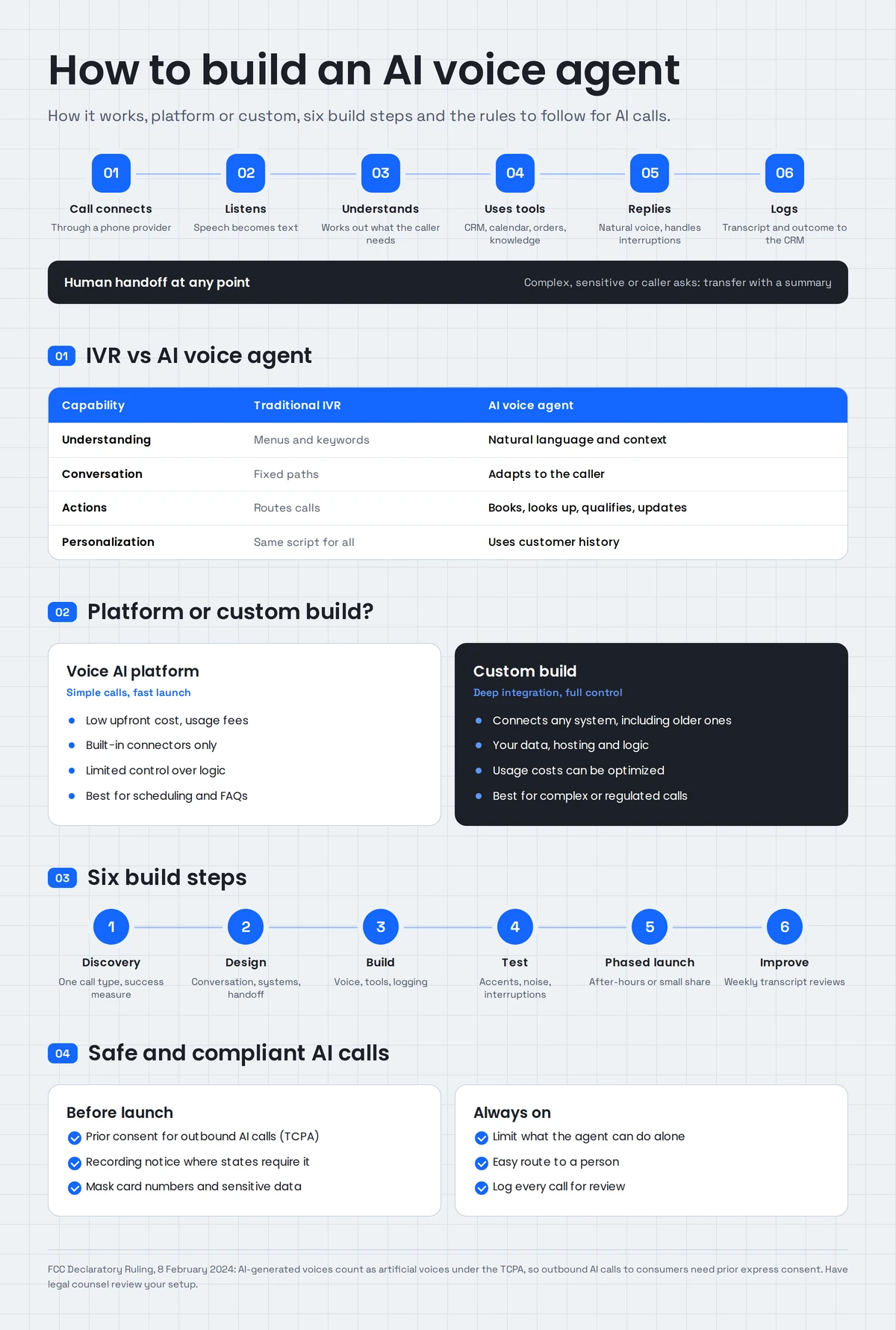
An AI voice agent works in a loop: it listens to the caller, converts speech to text, decides what the caller needs, looks up or updates information through connected systems, generates a reply and speaks it back. All of this has to happen fast enough to feel like a natural conversation, including when the caller interrupts.
What happens on a typical call:
- The call connects through a phone provider such as Twilio.
- The agent greets the caller and listens.
- It understands the request and asks follow-up questions if something is missing.
- It uses tools: checks the CRM, finds a free slot in the calendar or looks up an order.
- It completes the task or explains the next step.
- It hands off to a person if the request is complex, sensitive or the caller asks.
- It logs everything: transcript, summary and outcome go to the CRM.
Two technical details matter more than most buyers expect: response speed, because pauses make callers talk over the agent and interruption handling, because real callers don't wait for the agent to finish.
How is an AI voice agent different from IVR?
An IVR (interactive voice response) system makes callers press keys or say set phrases to move through fixed menus. An AI voice agent understands natural speech, adapts to the conversation, takes actions in your systems and personalizes responses using customer data.
| Capability | Traditional IVR | AI voice agent |
|---|---|---|
| Understanding | Menu choices and keywords | Natural language and context |
| Conversation flow | Fixed paths | Adapts to what the caller says |
| When confused | Repeats the menu or transfers | Asks a clarifying question and continues |
| Actions | Routes calls | Books, updates, looks up and qualifies |
| Personalization | Same script for everyone | Uses customer history from your systems |
| Improvement | Manual menu changes | Improves as you review calls and adjust rules |
What can AI voice agents do for a business?
AI voice agents can answer inbound calls at any hour, book and reschedule appointments, qualify and follow up with leads, answer common questions from approved content, check order or account status, take messages, send reminders and route urgent calls to the right person.
| Area | Common use cases |
|---|---|
| Sales | Calling new leads quickly, qualifying them, booking meetings |
| Customer service | Answering FAQs order status, account questions, ticket creation |
| Scheduling | Booking, rescheduling and reminder calls |
| Front desk | After-hours answering, message taking, call routing |
| Healthcare | Appointment booking and reminders, with HIPAA safeguards |
| Real estate | Answering listing inquiries and booking showings |
| Insurance | First notice of loss intake and policy questions |
| Internal operations | IT help desk triage, HR questions |
The best first use case is usually high-volume, repetitive and easy to check, such as appointment booking or new-lead follow-up.
Should you use a platform or build a custom voice agent?
Use a voice AI platform when your calls are simple and the platform connects to your systems. Build a custom voice agent when you need deep integration with several business systems, strict security or compliance controls, custom logic or ownership of the code and data. Many businesses start on a platform and customize around it.
| Factor | Voice AI platform | Custom build |
|---|---|---|
| Speed to launch | Fast | Slower, delivered in phases |
| Upfront cost | Low | Higher |
| Integrations | Built-in connectors only | Any system, including older ones |
| Control over logic | Limited | Full |
| Data and hosting | Vendor's terms | Your choice, including your own cloud |
| Usage costs at scale | Per-minute fees can grow | Can be optimized |
| Best for | Simple scheduling and FAQs | Complex, regulated or high-volume calls |
A common middle path is to use a platform such as Vapi for the voice layer and build custom integrations, logic and reporting around it. That's how our own product, Zonified Connect, is built.
How to build an AI voice agent: 6 steps
Building an AI voice agent takes six steps: discovery, conversation and integration design, development, testing on real calls, a phased launch and ongoing improvement. Each step ends with something you can review, so problems are found before callers hear them.
- Discovery. Pick one call type. Listen to real recordings, list what callers ask and define success, such as calls resolved without transfer or appointments booked.
- Design the conversation and integrations. Map the conversation, the questions to ask, what to do when the agent isn't sure and when to hand off. List every system it needs to read or update.
- Build. Set up the phone number and voice layer, write the agent's instructions, connect the tools (CRM, calendar order system) and add logging.
- Test on real calls. Run hundreds of test calls with different accents, background noise, interruptions and unusual requests. Fix what fails.
- Launch in phases. Start with after-hours calls or a small share of traffic, with a person reviewing transcripts daily.
- Improve continuously. Review transcripts weekly, update rules and knowledge and track your success measures.
If you'd rather have a team handle these steps, our AI voice agent development service covers discovery through launch and ongoing tuning.
What should an AI voice agent connect to?
An AI voice agent should connect to the systems it needs to answer and act: your CRM for customer details and call logging, your calendar for booking, your order, billing or ticketing system for status checks, your knowledge base for answers and your phone system for transfers to the right person.
| System | What the voice agent does with it |
|---|---|
| CRM (HubSpot, Salesforce, Follow Up Boss and others) | Looks up the caller, logs the call, updates status |
| Calendar (Google, Outlook) | Finds open slots and books appointments |
| Order, billing or ticketing system | Checks status, creates tickets |
| Knowledge base or documents | Answers questions from approved content |
| Phone system | Transfers calls with a summary to the right person |
| SMS | Sends confirmations and reminders |
Answers from documents work best with retrieval-augmented generation (RAG), where the agent first finds the relevant passage in your content and then answers from it. Our RAG development and AI integration services cover these connections.
How do you make an AI voice agent safe and compliant?
Make an AI voice agent safe and compliant by getting consent before outbound AI calls, telling callers when recording applies, limiting what the agent can do on its own, hiding sensitive data in transcripts, logging every call and giving callers an easy way to reach a person. Requirements vary by industry and state.
- Outbound calls and consent. On 8 February 2024, the FCC ruled that AI-generated voices count as artificial voices under the Telephone Consumer Protection Act, so AI calls to consumers need prior express consent and written consent for telemarketing. Do-not-call rules and calling hours also apply.
- Call recording. Some states require every party's consent to record. Tell callers at the start of the call.
- Sensitive data. Mask card numbers and other sensitive details in transcripts and logs. Healthcare calls need HIPAA safeguards; payments need PCI DSS-compliant handling.
- Guardrails. Give the agent only the actions it needs and require a person for refunds, cancellations or anything irreversible.
- Human handoff. Callers should always be able to reach a person and the person should receive the conversation summary.
- Logging and review. Keep transcripts and outcomes so you can audit and improve.
Have legal counsel review your consent language and calling setup before launch.
Real example: Zonified Connect
Zonified Connect is our own AI voice CRM. Its voice and SMS agents contact each new lead on the business's own rules, from the first text to a confirmed appointment and log every conversation.
The problem: new leads waited for someone to call back and evenings and weekends went uncovered.
What it connects to: HubSpot, Google and Outlook calendars, Vapi and Twilio. It's built with Python, voice AI, language model agents, REST APIs and webhooks.
Design choices that matter: the agent books only after the lead confirms a time and the moment a person takes over a conversation, the automation steps back. See how Zonified Connect works.
How much does an AI voice agent cost?
AI voice agent cost depends on whether you use a platform or a custom build, the number of systems connected, call volume, languages, compliance needs and how much custom logic is required. Platforms charge mainly for usage, often by the minute, while custom builds add development cost but give more control over long-term usage costs.
What moves the cost:
| Driver | Lower cost | Higher cost |
|---|---|---|
| Approach | Platform with built-in connectors | Custom build |
| Integrations | Calendar and one CRM | Many systems, including older ones |
| Call volume | Low | Thousands of minutes a month |
| Use cases | One call type | Many call types and languages |
| Compliance | Standard business calls | Healthcare, payments or regulated outbound calling |
A simple ROI worksheet
Instead of relying on industry averages, estimate the return with your own numbers:
- Calls per month the agent could handle.
- Minutes per call your team spends today.
- Cost per staff hour.
- Missed or after-hours calls per month and how many become customers when answered.
- Average value of a new customer.
Staff time saved plus revenue from calls you currently miss, minus the agent's monthly running cost, gives a realistic monthly return. Start with one call type so you can measure it accurately.
What are the common challenges and how do you solve them?
The common challenges in AI voice agent projects are slow responses, misunderstood accents or background noise, callers interrupting, wrong or made-up answers, poor handoffs and messy integrations. Most are solved with careful design, testing on real calls, limited agent permissions and regular transcript reviews.
| Challenge | What goes wrong | How to solve it |
|---|---|---|
| Slow responses | Callers talk over the agent | Choose fast components; keep tool calls short |
| Accents and noise | Words are misheard | Test with real callers; confirm key details back |
| Interruptions | Agent keeps talking | Enable interruption handling and short replies |
| Wrong answers | Agent guesses | Answer only from approved content; say "let me connect you" when unsure |
| Poor handoffs | Caller repeats everything | Pass a summary to the person taking over |
| Integration errors | Bookings fail or data is missing | Test integrations separately; add error messages and fallbacks |
Want a second opinion on your call flows? Book a 30-minute call with our CTO and we'll review which calls to automate first and what your systems need.
How do you choose an AI voice agent development company?
Choose an AI voice agent development company that can show live voice agents in production, connects to your specific systems, explains its approach to consent, data and handoffs, tests on real calls, gives you ownership of your data and logic and provides clear support after launch.
Questions to ask:
- Can we call a voice agent you've built and try it ourselves?
- How will it connect to our CRM, calendar and other systems?
- How do you handle interruptions, accents and background noise?
- What happens when the agent doesn't know the answer?
- How do you handle consent, recording and sensitive data?
- Who owns the call data, prompts and integrations?
- What do support, monitoring and tuning look like after launch?
- How do usage costs change as call volume grows?
If you're comparing partners, see how we work on our AI voice agent development services page. For agents that work across chat, email and back-office systems as well as voice, see our AI agent development services.
Start with the calls you miss most
The easiest win is usually the calls your team can't answer today: after hours, during busy periods or new leads waiting for a callback. Automate those first, measure the results, then expand.
AllZone Technologies designs, builds and runs AI voice agents connected to your CRM, calendar and business systems. Explore our AI voice agent development services or contact us to plan your first voice agent.