A claim is the moment an insurance company proves its promise. It's also where the paperwork piles up. A loss is reported by phone, photos arrive by email and the police report is a scanned PDF. Then a coverage question sends the adjuster digging through policy wordings.
AI claims processing takes on the repetitive parts of that work. It captures the claim, reads the documents, checks them against the policy, routes the file and keeps the claimant informed. Adjusters keep the decisions. Done well, AI shortens the time a claim sits waiting for someone to read, type or search, without replacing the claims system you already run.
Below, you'll see where AI helps in a claim and what should stay with people. You'll also see how AI connects to your claims platform and ERP, what regulators expect, and how to prove results with one claim type.
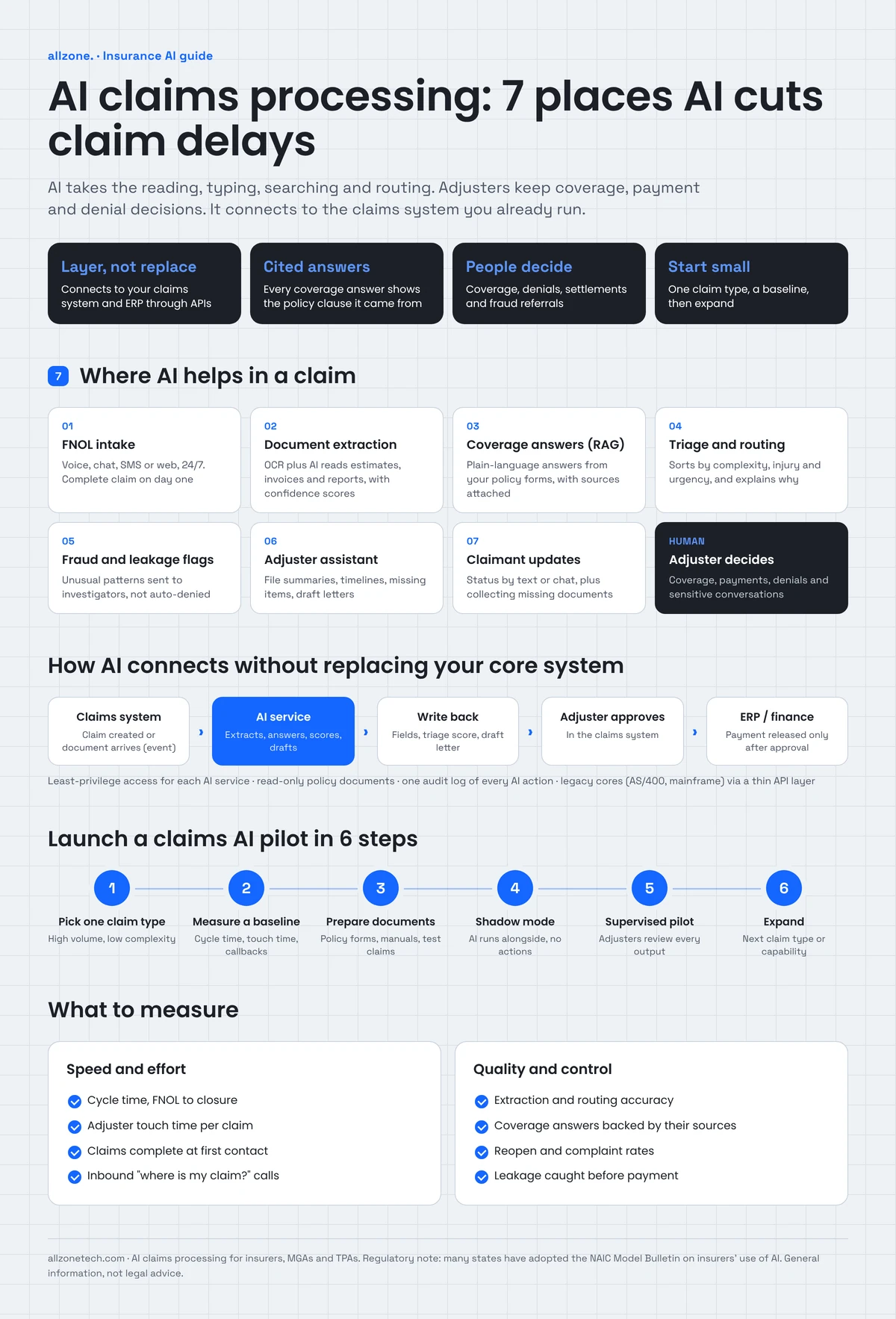
Quick answer: AI claims processing automates intake, document extraction, coverage lookups, triage and claimant updates, while adjusters approve coverage, payments and denials. It works best as a layer connected to your existing claims system through APIs, with every AI step logged and every answer tied to its source.
Key takeaways
- AI is most useful in the slow, manual steps of a claim: intake, document reading, policy lookups, routing and status updates.
- Coverage decisions, denials, settlements and difficult conversations should stay with licensed people.
- You don't need to replace your claims platform. AI can sit beside it and connect through APIs, events or, for older systems, a controlled integration layer.
- Answers about coverage must cite the policy clause they came from. An unsourced answer is not usable in claims.
- Start with one high-volume, low-complexity claim type, measure a baseline, and expand only when the numbers hold.
What is AI claims processing?
AI claims processing uses machine learning, document AI and large language models to handle routine parts of an insurance claim. These are the steps that used to need a person to read, type, search or route the file.
It is not one product. In practice it is a set of capabilities around the claims workflow:
| Capability | What it does in a claim |
|---|---|
| Conversational intake | Takes first notice of loss by phone, chat, web form or email and turns it into a structured claim record |
| Document AI (OCR plus extraction) | Reads photos, PDFs, invoices, estimates and reports, and pulls out the fields the claim needs |
| Retrieval-augmented generation (RAG) | Answers coverage and procedure questions from your own policy wordings and handbooks, with the source passage attached |
| Classification and scoring | Sorts claims by type, complexity and urgency, and routes them to the right queue |
| Anomaly and fraud signals | Flags patterns that deserve a closer look by a special investigations unit |
| Drafting assistants | Summarize long files, draft letters and suggest next steps for the adjuster to review |
Traditional claims automation follows fixed rules: if field A equals X, send the file to queue B. AI adds the ability to read unstructured information, such as a photo of a damaged bumper or a 40-page medical record. It can also answer questions in plain language. The rules and approval steps still matter; AI works inside them.
Where claims slow down today
Before choosing tools, it helps to be honest about where time actually goes in a claim. In most claims teams, the delays are not in the decision itself. They are in the waiting around it.
- Intake is inconsistent. Claims arrive by phone, email, portal, broker and app, each with different details missing. Someone has to call back for the policy number, the date of loss or a photo.
- Documents are unstructured. Estimates, invoices, police reports and medical records come in dozens of layouts. Staff retype the same fields into the claims system.
- Coverage questions take digging. Policy forms, endorsements and state amendments differ. Adjusters search shared drives or ask a senior colleague who remembers a similar case.
- Routing is manual. A supervisor reads each new claim to decide who should handle it. Complex claims can sit in a general queue for days.
- Claimants chase updates. "Where is my claim?" calls take up adjuster time and frustrate customers.
- Handoffs lose context. When a file moves between intake, adjusting, SIU and payments, each person rereads it from the start.
Each of these is a place where AI can help, and each has a clear owner and a measurable delay. That's what makes claims a good first target for AI in insurance.
7 places AI helps in the claims lifecycle
1. First notice of loss (FNOL) intake
An AI intake assistant can take a first notice of loss by voice, chat, SMS or web form at any hour. It asks the right questions for the claim type, checks the policy is active, collects photos and documents, and creates a structured claim record in your claims system.
The value is completeness. A claim that arrives with the policy number, date and place of loss, description, photos and contact preferences on day one can move straight to the next step instead of waiting for a callback.
Good intake assistants also know when to stop. Injury claims, distressed callers and anything the assistant is unsure about should transfer to a person with the conversation so far attached. Our AI voice agent development work follows the same rule: the agent handles routine calls and hands off the rest with full context.
2. Document capture and extraction
Document AI combines optical character recognition (OCR) with models that understand layout and meaning. It reads an estimate, invoice, police report or medical bill and pulls out the fields the claim needs: dates, amounts, parties, vehicle details, procedure codes or line items.
Modern extraction handles documents it hasn't seen before far better than template-based OCR did, but it still makes mistakes. The safe pattern is:
- extract each field with a confidence score
- auto-fill fields above a threshold you set
- send low-confidence fields to a person to confirm
- keep a link from every extracted value back to the page it came from
This turns data entry into data checking, which is faster and easier to audit.
3. Coverage questions answered from your own policy documents
Adjusters spend a lot of time on questions like "Does this endorsement cover water damage from a burst pipe in an unoccupied home?" The answer is in the policy wording, but finding it takes time.
A retrieval-augmented generation (RAG) assistant searches your own policy forms, endorsements, claims manuals and guidelines, finds the passages that apply, and writes a plain-language answer with those passages attached. The adjuster reads the answer, checks the clause, and decides.
Citations are the whole point. In claims, an answer without a source can't be used, because the adjuster has to be able to show why a decision was made. We explain how RAG works in more detail in our guide on what RAG is in machine learning.
4. Triage and routing
AI can read each new claim and sort it by line, complexity, severity, potential litigation, potential subrogation and urgency. A simple glass claim goes to a fast-track queue. A claim with injury, a large loss estimate or an attorney letter goes straight to an experienced adjuster.
Triage models should explain their reasons ("routed to complex queue: injury reported, estimate above threshold, attorney named"), so supervisors can check and override them.
5. Fraud and leakage signals
AI can compare a claim with patterns in past claims and flag anything unusual: inconsistent dates, repeated parties, images that appear in other claims, invoices that don't match the damage described, or providers with unusual billing patterns.
A flag is a reason to look closer, not a finding of fraud. Flagged claims should go to a trained investigator, and the reasons for each flag should be recorded. This also helps with leakage, meaning money paid that shouldn't have been, such as duplicate invoices or line items outside the coverage.
6. An assistant for adjusters
Large claims files can run to hundreds of pages. An adjuster assistant can:
- summarize the file so far, with links to the source documents
- build a timeline of events from notes, emails and reports
- list what's missing before the claim can move forward
- draft routine letters, such as acknowledgments, requests for information and status updates
- suggest next steps based on your claims guidelines
The adjuster reviews and edits everything before it goes out. The time saved is in reading and drafting, not in judgment.
7. Claimant communication and status updates
Many claimant calls are status checks. An AI assistant connected to the claims system can answer "Where is my claim?" by phone, chat or text, explain what happens next, and collect missing documents. It can send proactive updates when the claim moves to a new stage, which reduces inbound calls in the first place.
The assistant should only share what the claimant is entitled to see, and should hand off to a person for disputes, complaints or anything emotional.
What should stay with people
AI is good at reading, sorting, searching and drafting. It should not be the final word on decisions that affect someone's money or rights. Keep these with licensed, accountable people:
- Coverage decisions, especially partial coverage or exclusions
- Denials, which need a clear explanation the insurer can stand behind
- Settlement amounts and payments above a low, pre-agreed threshold
- Fraud referrals and anything that could lead to legal action
- Conversations with claimants in distress, after a death, injury or major loss
- Exceptions the AI hasn't seen before or isn't confident about
A useful test: if a regulator, a court or the claimant asked "Who decided this, and why?", you should be able to name a person and show the evidence they used.
Free claims workflow review
Pick one claim type. In a 30-minute call, we'll walk through how it moves today, show where AI would save the most adjuster time and tell you what a pilot would connect to. See our insurance software services
How AI connects to your claims system and ERP
This is the question most claims and IT leaders ask first: can we add AI without replacing our core system? In most cases, yes. AI works as a layer beside your claims platform, reading from it and writing back only what you allow.
The integration pattern
- A secure API layer. AI services call your claims system, policy administration system and document store through APIs, using service accounts with the minimum permissions each task needs. Intake can create a claim; it can't approve a payment.
- Events, not polling. When a claim is created or a document arrives, the claims system sends an event. The AI service picks it up, does its work and writes the result back, such as extracted fields, a triage score or a draft letter.
- Approval before money moves. Payments flow to your ERP or finance system only after an adjuster approves them in the claims system. AI can prepare the payment; it doesn't release it.
- Read-only access to reference data. Policy forms, rate tables and guidelines are read, not changed.
- One audit log. Every AI action is recorded: what came in, what the model did, which sources it used, what it wrote back and who approved it.
What if the claims system has no modern APIs?
Many carriers and TPAs run claims on older platforms, sometimes on IBM i (AS/400) or mainframe systems. Options include:
- a thin API layer in front of the legacy system that exposes the few functions AI needs
- scheduled file exchanges for batch work, such as nightly extraction jobs
- event capture from the database or message queue the system already uses
- as a last resort, carefully controlled screen automation for a narrow task
Each option has trade-offs in speed, reliability and maintenance. For a deeper look, see our guides on how to integrate AI into existing systems and AI ERP integration.
A quick checklist before you connect AI to claims data
- Which systems will the AI read from, and which will it write to?
- Which actions need human approval?
- Where will claimant data be processed and stored, and for how long?
- Does the model provider keep or train on your data? (Choose settings and contracts that say no.)
- How will you log, monitor and review every AI action?
- Who owns the system on the business side and on the technical side?
RAG in insurance claims: a closer look
Queries like "RAG use in insurance claims processing" show growing interest in this pattern, so it's worth explaining how it works in a claims setting.
- Ingest. Policy forms, endorsements, state amendments, claims manuals and guidelines are loaded, split into passages and indexed for search. Each passage keeps its source document, section and version.
- Retrieve. When an adjuster asks a question, the system finds the passages most relevant to that question and that policy form.
- Generate with citations. A language model writes a short answer using only those passages, and attaches them. If the passages don't answer the question, the assistant says so instead of guessing.
- Monitor. The team tracks whether answers are grounded in the retrieved text, which sources get used, and where adjusters disagree with the assistant.
Real example: an insurance claims RAG assistant. We built a retrieval assistant over an insurance organization's own policy and claims documentation. Claims staff ask questions in plain language and get an answer tied to the supporting policy language, with the source passage attached. Retrieval is kept separate from generation, so the evidence behind every answer can be traced, and retrieval quality and grounding are monitored in production. The result is that a claims professional checks an answer against the clause it came from instead of taking a summary on trust, and knowledge that used to live with long-tenured staff is available to the whole team. Read the Insurance Claims RAG Assistant case study.
When does straight-through processing make sense?
Straight-through processing means a claim moves from intake to payment with no human touch. It's appealing, but it only suits a narrow set of claims:
- low value, under a threshold you set
- simple, common loss types, such as glass or minor property damage
- clear coverage, with no exclusions in play
- complete documents with high-confidence extraction
- no fraud signals and no injury
Even then, keep sampling: have people review a share of auto-processed claims every week, and stop the flow quickly if error rates rise. For everything else, aim for "straight-through to the adjuster": the claim arrives complete, summarized and routed, ready for a decision.
Is AI in claims regulated?
Yes. There's no single federal AI law for insurance, but insurers' use of AI is covered by state insurance regulation and existing consumer protection rules.
- The NAIC Model Bulletin. The National Association of Insurance Commissioners adopted its Model Bulletin on the Use of Artificial Intelligence Systems by Insurers in December 2023. It expects insurers to have a written AI program covering governance, risk management, internal controls and oversight of third-party AI vendors. As of April 2026, 24 states and Washington, D.C. had adopted it. Check the NAIC's AI resources for your states.
- Unfair claims settlement practices laws. State laws based on NAIC model acts require prompt, fair investigation and clear explanations. Using AI doesn't change those duties.
- Unfair discrimination rules. Some states have gone further. Colorado, for example, requires certain insurers to show that their use of external data and algorithms doesn't unfairly discriminate.
- Privacy and data security. Claimant data is personal and often sensitive. State privacy laws, insurance data security laws and, for health-related claims, HIPAA may apply.
In practice, regulators want to see the same things a good claims leader would: documented use cases, human oversight of decisions, testing for accuracy and bias, explainable outcomes, vendor due diligence and records of what the AI did. Our AI governance guide shows how to put a policy in place before you scale.
How to implement AI claims processing: 6 steps
Step 1: Pick one claim type
Choose a line and loss type with high volume, low complexity and clear rules, such as auto glass, minor auto physical damage or simple property claims. Avoid starting with injury, liability or litigation-prone claims.
Step 2: Measure a baseline
Before you change anything, record how the process performs today: average cycle time, adjuster touch time per claim, the share of claims needing a callback for missing information, reopen rates, extraction errors, and inbound status calls. Without a baseline, you can't prove results.
Step 3: Prepare documents and data
Gather the policy forms, endorsements, manuals and a set of past claims for testing. Clean up duplicates and outdated versions. Decide which systems the AI may read and write.
Step 4: Build and run in shadow mode
Run the AI alongside your current process without letting it act. Compare its extractions, routing and answers with what your team did. Fix what goes wrong.
Step 5: Pilot with people in control
Turn the AI on for a share of new claims, with adjusters reviewing every output. Track accuracy, time saved and adjuster feedback every week.
Step 6: Expand one step at a time
Once one claim type is reliable, add another, or add the next capability, such as claimant updates after intake and extraction. Keep monitoring accuracy and cost as volume grows.
If you're not sure where to start, a short discovery workshop can map your claims process and pick the first use case.
What to measure
| Metric | Why it matters |
|---|---|
| Cycle time (FNOL to closure) | The headline measure claimants feel |
| Adjuster touch time per claim | Shows where staff time is actually saved |
| First-contact completeness | Share of claims that arrive with everything needed |
| Extraction accuracy | Share of fields correct without human correction |
| Citation accuracy | Share of coverage answers whose sources actually support them |
| Routing accuracy | Share of claims sent to the right queue first time |
| Inbound status calls | Should drop as proactive updates go out |
| Reopen and complaint rates | Guards against speed at the expense of quality |
| Leakage found | Money caught before it's paid in error |
Build, buy or combine?
Most core claims suites now offer AI features, and specialist vendors sell point tools for intake, document extraction or fraud detection. A custom layer makes sense when:
- your claims run across several systems that no single vendor tool connects
- you need AI to follow your own guidelines, forms and approval rules
- you want one audit trail across intake, documents, coverage answers and routing
- you need to keep data in your own cloud environment
- your core system is older and vendors' AI modules don't support it
Many insurers combine both: they use built-in features where they fit and add a custom layer for the gaps. We cover the trade-offs in our guide on custom insurance software: when to build, when to buy and how to combine both.
What does AI claims processing cost?
Cost depends on the number of claim types and capabilities, how many systems the AI connects to, document volume and variety, the condition of your policy documents, hosting and security requirements, and the level of human review you want. Running costs grow with volume, because each document and question uses model processing.
The most reliable way to control cost is to start with one claim type and one or two capabilities, prove the savings against your baseline, and then expand. Our guide to AI development cost explains the main price drivers.
Illustrative example: auto physical damage claims at a regional carrier
This example is illustrative, not a client case study.
A regional property and casualty carrier handles a steady stream of minor auto physical damage claims. Most are simple, but each one needs a callback for missing photos or details, manual entry of the repair estimate, and a status call or two from the policyholder.
The carrier starts with three capabilities:
- Intake: an assistant takes FNOL by phone and web, checks the policy, and asks for photos and the repair shop's details before the claim is created.
- Extraction: estimates and invoices are read automatically, with low-confidence fields sent to a claims assistant to confirm.
- Status updates: policyholders get a text when the claim moves to a new stage, and can ask questions by text.
Adjusters still approve every payment. After a shadow period and a supervised pilot, the team compares cycle time, touch time and inbound calls with the baseline before deciding whether to add triage and coverage answers next.
Ready to take the waiting out of your claims?
Tell us which claim type takes your team the most time. We'll map the process, show where AI fits, and plan a pilot that connects to the systems you already run.
Explore our insurance software development services or book a 30-minute call with our CTO.