A buyer fills in a form on Saturday night. Your best agent is at a family dinner, the inside sales rep is off and by Monday morning the buyer has already booked a showing with someone else.
Most agents don't lose deals because they lack skill. They lose them in the gaps: slow first replies, missed calls, follow-up that stops after two tries and a CRM nobody has time to update. AI is good at exactly those gaps. It isn't good at pricing advice, negotiation or reading a nervous seller and it shouldn't try to be.
This guide shows where AI helps real estate agents, where it doesn't, which rules apply, and how a team or brokerage can roll it out without creating new problems.
Quick answer: Real estate agents use AI to reply to new leads in minutes, answer calls when they can't, qualify and book showings, draft listing descriptions and emails, summarize documents and keep the CRM updated. The agent still owns advice, pricing, negotiation and relationships. The best results come when AI is connected to your CRM, calendar and phone system rather than used as a separate chat window.
How many real estate agents use AI today?
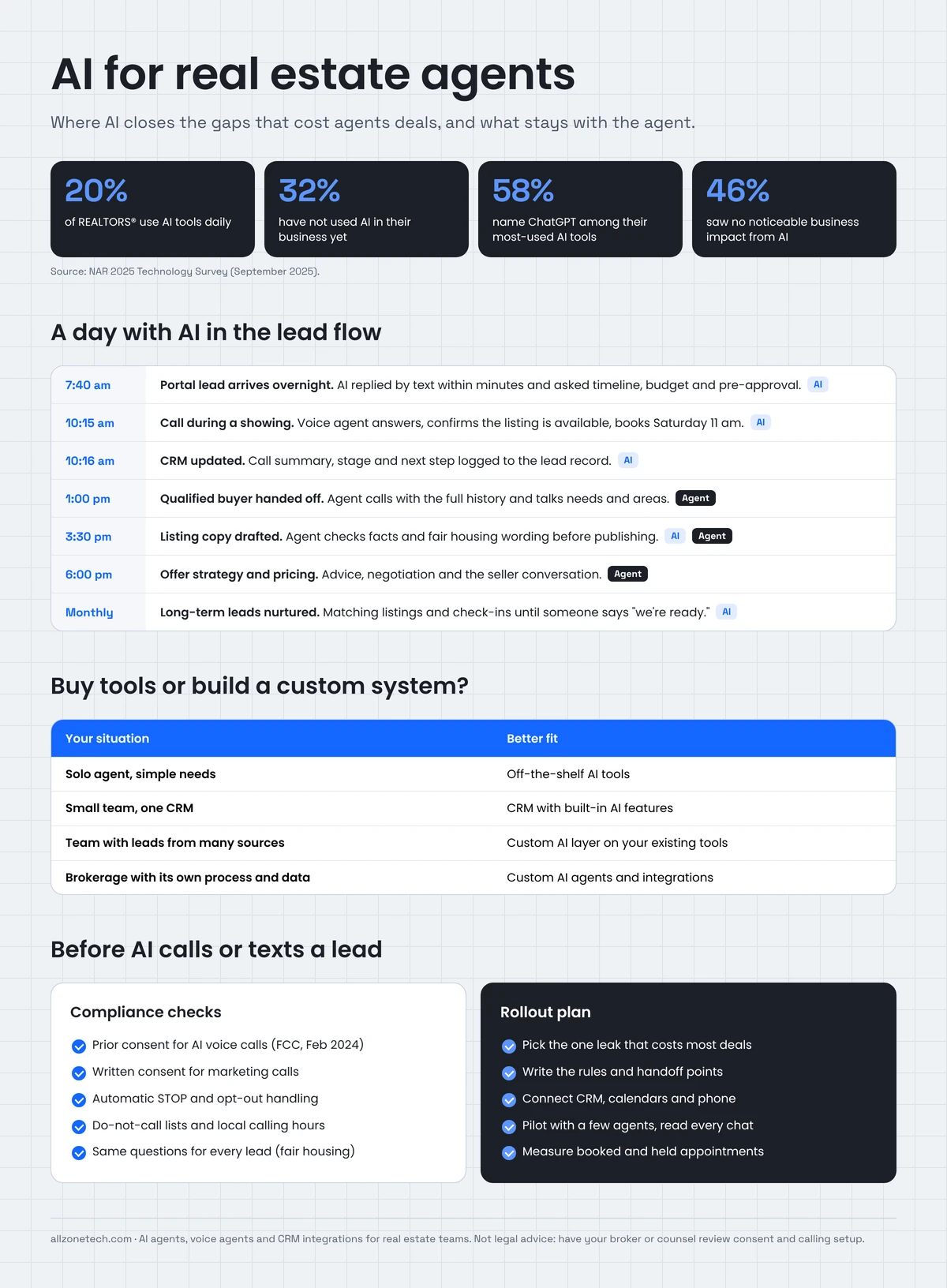
Most agents already use AI in some form, but few use it in their lead flow. The National Association of REALTORS® 2025 Technology Survey found that 20% of members use AI tools daily, 22% weekly and 27% a few times a month, while 32% had not yet used AI in their business. ChatGPT was the most used tool (58%), and 46% reported using AI-generated content such as listing descriptions (NAR, September 2025).
The same survey reported mixed results: 17% saw a significantly positive impact on their business, 33% a moderately positive one, and 46% no noticeable impact.
That split matters. Writing a listing description faster is useful, but it rarely changes how many deals an agent closes. The bigger gains come from AI that works inside the sales process: answering leads, booking appointments and keeping follow-up going.
Where do real estate agents lose deals?
Before choosing any AI tool, find where your deals leak. In most teams it's one or more of these:
| Leak | What happens | Why it costs deals |
|---|---|---|
| Slow first reply | Agents are in showings, driving or with clients | The lead contacts the next agent who answers |
| Missed calls | Evenings and weekends go to voicemail | Many callers don't leave a message |
| Follow-up stops early | Manual follow-up ends after one or two tries | Leads that aren't ready today are forgotten |
| Leads in too many places | Portals, website, social ads, sign calls, open houses | Nobody sees the full picture |
| CRM out of date | Calls and notes aren't logged | Managers can't coach, and handoffs fail |
| Admin overload | Listing copy, emails, document review, scheduling | Less time for clients and prospecting |
AI is useful for every row in this table. The order you tackle them in should follow the money: fix the leak that loses the most deals first.
9 ways real estate agents use AI
1. Instant lead response
What it does: when a lead arrives from your website, a portal or an ad, AI sends a personalised text or email within minutes. It can also place a call, ask a few qualifying questions and offer times to talk or view a property.
Why it matters: speed of first response is one of the few things an agent fully controls, and buyers and sellers often go with whoever replies first.
What to keep human: the first real conversation about needs, budget and next steps.
This is the job our own product, Zonified Connect, was built for. AI voice and SMS agents contact each new lead using a sequence the business sets up. Every conversation is logged to the lead record, and appointments are booked only after the lead confirms a time and an email address. Automated contact stops once a lead reaches the Quoted stage, when the team takes over.
2. Answering calls you can't take
What it does: an AI voice agent answers when you're in a showing or after hours. It handles common questions (Is this listing still available? Can I see it Saturday? Do you work with first-time buyers?), books appointments, and transfers or flags urgent calls.
What to keep human: anything involving advice, offers, complaints or emotion. A good voice agent knows its limits and hands off cleanly.
3. Lead qualification and routing
What it does: AI asks the questions your team would ask, such as timeline, pre-approval status, price range, area and buying or selling, then scores the lead and routes it to the right agent or pond.
Why it matters: agents spend their time on people who are ready, and long-term leads go into nurture instead of being dropped.
Keep in mind: qualification rules must be applied the same way to everyone. More on fair housing below.
4. Long-term nurture
What it does: AI keeps in touch with leads who aren't ready yet. It can send new listings that match their criteria, market updates and check-ins, and it flags the moment someone replies with interest.
Illustrative example: a buyer says they're "looking next spring." Instead of a reminder that gets ignored, AI sends a check-in each month and matching listings when they appear. When the buyer replies "we're ready to start looking," it alerts the agent with the full history.
5. Showing and appointment scheduling
What it does: AI checks the agent's calendar, offers available slots, confirms by text and sends reminders. It can also reschedule when plans change.
Why it matters: scheduling takes many messages for every appointment, and no-shows waste agent time.
6. CRM updates and call summaries
What it does: after every AI or human call, AI writes a short summary, updates the lead's stage and logs the next step.
Why it matters: a CRM is only as good as its data. When logging happens automatically, managers can see the real pipeline, and handoffs between agents don't lose context.
7. Listing descriptions and marketing copy
What it does: generative AI drafts listing descriptions, social posts, email campaigns and open-house invitations from the property facts you provide.
What to check: every fact (square footage, features, school names, HOA details) against your own records. Also check for wording that could raise fair housing concerns, such as phrases describing who the property is "perfect for." Many MLSs also have rules on AI-edited or virtually staged photos, so check yours before publishing.
8. Document questions and summaries
What it does: AI reads disclosures, HOA documents, inspection reports and leases, then answers questions with references to the source pages. This uses retrieval-augmented generation (RAG), the same approach we used in our Insurance Claims RAG Assistant, where answers come with citations to the source documents.
What to keep human: interpreting what a clause means for the client. AI points to the relevant section, and the agent, broker or attorney gives the advice.
9. Market and pipeline insights
What it does: AI pulls together pipeline data, lead sources, response times and conversion by agent. It answers questions in plain English, such as "Which lead sources booked the most appointments last quarter?"
Why it matters: broker-owners and team leads can see where money and time are wasted. Our data and analytics work covers the reporting layer this depends on.
What should AI do, and what should agents keep?
| Task | AI handles | The agent keeps |
|---|---|---|
| First response | Instant text, email or call | The first needs-based conversation |
| Calls | After-hours and in-showing answers, booking | Advice, negotiation, complaints |
| Qualification | Asks standard questions, scores and routes | Judgement on fit and priority |
| Follow-up | Ongoing nurture and listing alerts | Relationship and timing |
| Scheduling | Booking, reminders, rescheduling | Showing itself |
| CRM | Summaries, stages, next steps | Pipeline review and coaching |
| Marketing | First drafts of copy and posts | Fact-checking and final approval |
| Documents | Finding and summarising sections | Interpretation and advice |
| Pricing | Pulling comparable data | Pricing advice and strategy |
The rule of thumb is simple. AI handles anything that is repetitive, time-sensitive or administrative, and the agent handles anything that depends on trust, judgement or the law.
Is AI legal for real estate calls and texts?
Yes, when it's set up correctly. But the rules are strict, and penalties for getting them wrong can be large. These are the main areas to review with your broker or legal counsel before you launch.
AI voice calls and the TCPA. In February 2024, the FCC ruled that AI-generated voices count as "artificial" voices under the Telephone Consumer Protection Act. In practice, AI calls to consumers generally need prior consent, and marketing calls need prior express written consent. Calls must also identify who is calling and offer a way to opt out.
Texting. Business texting in the US runs through carrier registration (10DLC), and opt-out requests ("STOP") must be honoured quickly. Your AI system should handle opt-outs automatically across every channel.
Do-not-call lists and calling hours. Check numbers against the national and your internal do-not-call lists, and respect calling hours in the lead's time zone. State laws can be stricter than federal rules.
Fair housing. The Fair Housing Act applies to AI the same way it applies to people. AI must ask every lead the same questions and apply the same criteria, and it must not steer people by neighbourhood or describe properties in ways that signal a preferred buyer. Generated listing copy needs a human review for this reason.
Data privacy. Lead and client data should stay in systems you control, with access limited by role and logs of what the AI said and did. Our AI governance guide covers how to set policies before you scale.
Rules on AI calls, texting consent and state privacy laws change often. Have a qualified professional review your consent language and calling setup before going live.
Should you buy AI tools or build a custom system?
Both are valid choices; it depends on your size and how your business runs.
| Situation | Better fit | Why |
|---|---|---|
| Solo agent, simple needs | Off-the-shelf tools | Low cost, quick to start |
| Small team on a single CRM | Off-the-shelf tools with built-in AI features | Good enough if the tools connect |
| Growing team with leads from many sources | Custom AI layer on top of existing tools | Connects portals, CRM, phone and calendars into one flow |
| Brokerage with its own processes, brand and data | Custom AI agents and integrations | Your rules, your data, your workflow |
| Proptech company building a product | Custom development | AI is part of the product you sell |
Signs you've outgrown off-the-shelf tools:
- Leads still fall between systems even though each tool "has AI"
- Agents copy data between the CRM, phone system and calendar by hand
- You can't control what the AI says, or you can't see a log of it
- The tools can't follow your routing, compliance or handoff rules
- You pay for several overlapping tools that don't share data
A custom system doesn't mean replacing everything. In most cases we connect AI to the tools you already use, including your CRM, phone provider, calendars and lead sources, and build the agent logic around your process. Our AI integration services page explains how that works.
How to roll out AI in a real estate team
- Pick one leak. Start with the one that loses the most deals, usually new-lead follow-up or missed calls.
- Write the rules. Decide what the AI asks, what it says, when it books, when it hands off and when it stops. Write it down before anything is built.
- Connect the systems. Link your lead sources, CRM, calendars and phone. AI that can't see or update the CRM creates more work, not less.
- Set guardrails. Add consent checks, opt-out handling, calling hours, a script approved by your broker, and a full log of every conversation.
- Pilot with a few agents. Run it for a set period, read the conversations and fix what's wrong.
- Measure what matters. Track time to first response, contact rate, appointments booked and appointments that happened, not just messages sent.
- Expand. Add the next use case, such as nurture, documents or marketing, once the first one is working.
Illustrative example: a 15-agent team starts with after-hours lead response only. For the first month, the team lead reviews every AI conversation each morning and adjusts the qualifying questions twice. Once agents trust the handoffs, the team adds long-term nurture and automatic CRM summaries.
Does AI help leasing agents and property managers too?
Yes, and often even more than it helps sales agents, because leasing and property management involve a steady stream of repetitive questions.
Leasing enquiries. Renters ask the same things again and again: Is the unit available? What's the pet policy? Can I tour this week? What are the income requirements? An AI agent can answer from approved property information, book tours and send application links. Your leasing team then spends its time with qualified applicants.
Resident requests. AI can take maintenance requests by text, chat or phone. It collects the details and photos, sorts urgent issues (a water leak, no heat) from routine ones and creates the work order. Emergencies should always reach a person immediately.
Lease abstraction. Commercial and residential leases hide key terms across dozens of pages. AI can pull out dates, rent steps, renewal options and obligations into a structured summary that links to the source clause. Someone still needs to check it, but the review is much faster than reading from scratch.
Rent reminders and renewals. Automated, polite reminders before due dates and renewal outreach at the right time reduce the manual chasing your team does every month.
Illustrative example: a property management company runs several hundred units. Its office phone rings constantly with availability questions and routine maintenance calls. An AI voice and chat agent answers those first, books tours and creates work orders in the property management system, and it transfers anything urgent or sensitive to staff. The office team gets back the hours it spent repeating the same answers.
The same rules apply here as in sales: consent for automated calls and texts, fair housing in every leasing conversation, and a clear handoff to a person. Our real estate software page covers AI for property management, leasing platforms and lease abstraction in more detail.
How much does AI for real estate cost?
Costs depend on what you need:
- Off-the-shelf tools: usually a monthly subscription per user or per seat.
- Custom AI systems: the price depends on the number of integrations, channels (voice, SMS, email), compliance requirements and usage. Voice minutes, telephony and AI model usage are ongoing running costs.
Our guide to AI development cost breaks down what drives the price. If you want to test an idea before a full build, an AI MVP is a lower-risk way to start.
Ready to stop losing leads to slow follow-up?
We build AI agents, voice agents and integrations for real estate teams, brokerages and property businesses. We connect them to the CRM, phone system and calendars you already use, and we build in your rules, your scripts and your compliance checks.
See what we build on our real estate software development page, or tell us where your team loses deals and we'll suggest where AI fits first.