AI Agent Examples: 7 Agents Running in Real Businesses and How They Work
AI agent examples in business include support agents that triage and resolve tickets, sales agents that contact new leads and book meetings, operations agents that rebuild recurring reports, knowledge agents that answer from company documents, and engineering agents that turn requirements into tested code. The ones that work in production are narrow, connected to real systems, and hand key decisions to a person.
Most lists of AI agent examples name famous companies and stop there. This one is different. Below are seven agents we designed, built and put into use, with what each one does, the systems it connects to, where a person stays in charge, and what we learned building it. After the examples, you'll find the patterns they share and a simple way to choose your own first agent.
What is an AI agent?
An AI agent is software that uses a language model to understand a goal, plan the steps, use tools such as your CRM, email or database, and complete multi-step work toward that goal. Unlike a chatbot, which answers and waits, an agent takes actions, and in business those actions usually pass through permission limits and human approval.
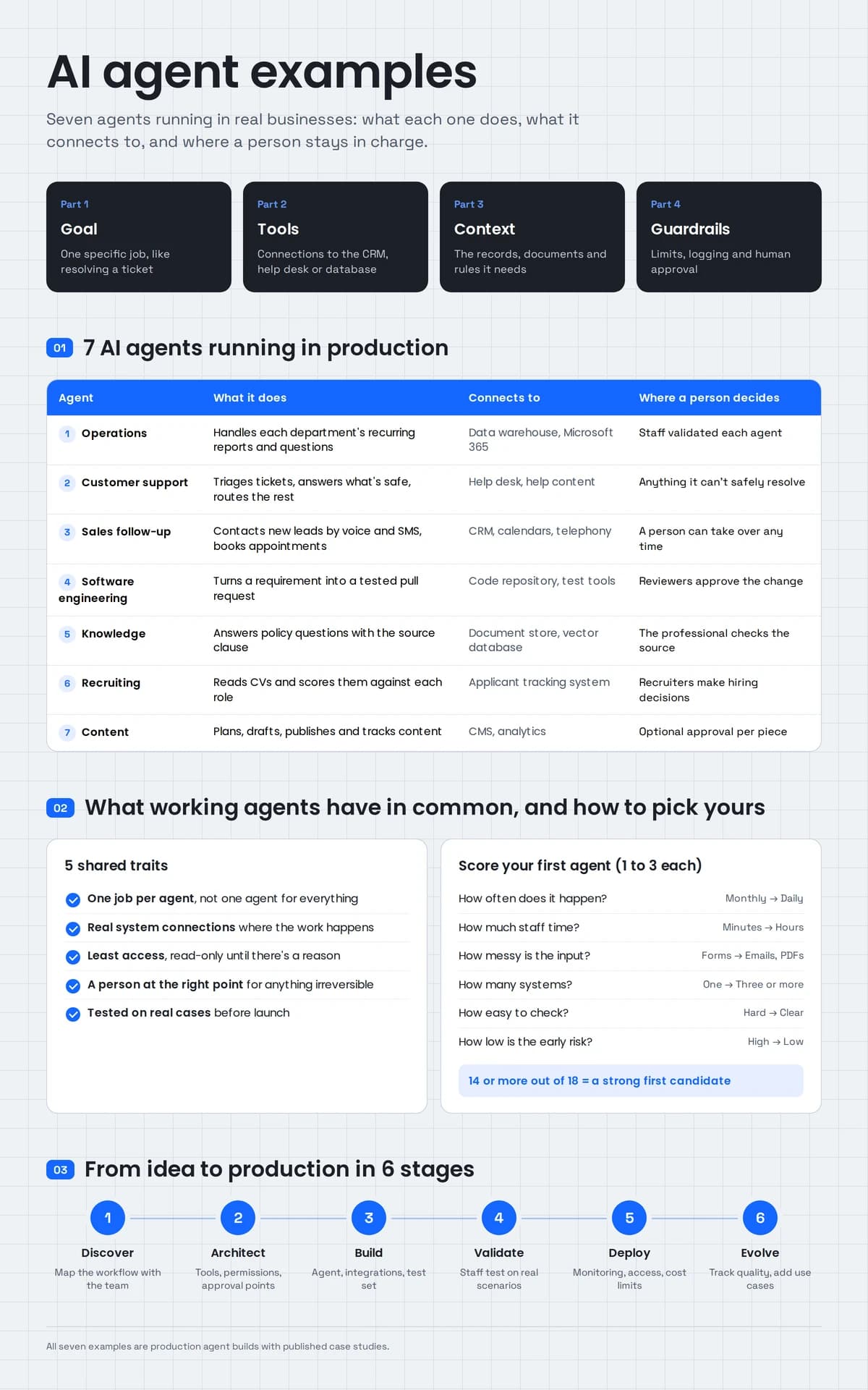
A working business agent has four parts:
- A goal: a specific job, such as "resolve this support ticket" or "qualify this lead".
- Tools: connections to the systems it needs to read from and act in.
- Context: the documents, records and rules it needs to decide well.
- Guardrails: limits on what it may do alone, and approval steps for anything that matters.
How is an AI agent different from a chatbot or automation?
A chatbot answers questions in a conversation. Rule-based automation runs the same fixed steps every time. An AI agent handles varied, messy input, decides which steps a case needs, and takes action across systems within set limits. If every case follows the same rules, plain automation is cheaper and more reliable than an agent.
| Chatbot | Rule-based automation | AI agent | |
|---|---|---|---|
| Main job | Answer questions | Run fixed steps | Complete a goal across steps |
| Messy input (emails, PDFs, calls) | Understands it | Struggles | Understands it |
| Takes action in your systems | Rarely | Yes, the same way every time | Yes, chosen case by case |
| Example | Website FAQ assistant | "When a form is submitted, create a CRM contact" | "Read this complaint, check the order, draft a reply and request a refund approval" |
This matters when you read other lists of AI agent examples. Many are chatbots or automations with a new label. The seven below all take real actions in business systems.
AI agent examples at a glance
| Example | What the agent does | Systems it connects to | Where a person decides |
|---|---|---|---|
| Department operations agents | Handle each department's recurring reports and questions | Enterprise data warehouse, Microsoft 365 | Staff validated each agent and use its output |
| Customer support agents | Triage tickets, answer what's safe, route the rest | Help desk, help content | Anything the agent can't safely resolve |
| Sales and lead follow-up agents | Contact new leads by voice and SMS, book appointments | CRM, calendars, telephony | A person can take over any conversation |
| Software engineering agents | Turn a requirement into a tested pull request | Code repository, test and review tools | Reviewers approve the change |
| Knowledge agents | Answer questions from policy and claims documents with sources | Document store, vector database | The professional checks the cited clause |
| Recruiting agents | Read CVs and score them against each role's criteria | Applicant tracking system | Recruiters make hiring decisions |
| Content and marketing agents | Plan, draft, publish and track content | CMS, analytics | Optional approval for each piece |
7 real AI agent examples from our projects
Each example below follows the same structure, so you can compare them and picture one in your own business.
1. Operations agents for every department
The problem: a precision manufacturer with no in-house AI team. Sales, production, quality, maintenance, logistics, finance, purchasing, planning and people teams each spent hours every week on the same recurring work, and process knowledge lived in a few people's heads.
What the agents do: the Manufacturing Agent Platform gives each of nine departments its own agent. Those agents are made up of ninety narrowly scoped sub-agents, each handling one recurring task.
What they connect to: the company's enterprise data warehouse and Microsoft 365, with access matched to each department's role. It's built with Claude Code, a multi-agent architecture, Model Context Protocol (MCP) and AWS.
Where a person decides: each sub-agent was validated against real scenarios by the staff who use it, and the client's own team maintains the platform after handover.
What we learned: ninety small agents are easier to test, trust and fix than a handful of large ones. When a sub-agent gets something wrong, you know exactly where to look.
2. Customer support agents
The problem: support volume grew faster than the team. Tickets piled up, simple questions crowded out complex ones, and response times slipped.
What the agents do: our Customer Support Agent Platform is a multi-agent setup that triages incoming tickets, answers what it safely can from the help content, and passes the rest to a person with the history already summarized.
What they connect to: the help desk and the company's help content.
Where a person decides: there is a clear path to a person at every step. Anything outside what the agent can safely resolve goes to the team, with the context attached so nobody starts from scratch.
What we learned: the handoff is as important as the answers. A support agent that resolves many tickets but hands over badly creates more work than it saves.
3. Sales and lead follow-up agents
The problem: new leads sat in an inbox until someone had time to call, and evenings and weekends went uncovered. Leads booked with whoever responded first.
What the agents do: Zonified Connect, our own AI voice CRM, uses voice and SMS agents to work each new lead on rules the business sets itself, from the first text to a confirmed appointment.
What they connect to: HubSpot, Google and Outlook calendars, Vapi and Twilio. It's built with Python, voice AI, LLM agents, REST APIs and webhooks.
Where a person decides: the agent books only after the lead confirms a time, and the moment a person takes over a conversation, the automation steps back.
What we learned: speed matters, but so does control. Keeping a person able to step in at any point is what makes automated outreach safe to switch on. For phone-heavy work, this is the core of our AI voice agent development.
4. Software engineering agents
The problem: small changes queued behind bigger work, and code reviews dragged because the evidence wasn't attached.
What the agents do: the Agentic Engineering Platform uses specialized agents to carry a requirement through planning, implementation, testing and review, with automated checks for tests, lint, security and coverage.
What they connect to: the code repository and the team's test and review tooling. It's built with LangGraph, LangChain, Claude Code, MCP and Python.
Where a person decides: a requirement arrives as a reviewable pull request, with its plan, tests, review findings and documentation attached. Human reviewers approve or reject the change.
What we learned: agents earn trust when they show their evidence. Reviewers judge the change on test results and findings, not on faith in the agent.
5. Knowledge agents for regulated documents
The problem: claims professionals searched scattered files to answer coverage questions, and a wrong answer in insurance is costly.
What the agent does: the Insurance Claims RAG Assistant answers questions in plain language over policy and claims documentation. Ask whether water damage from a burst pipe is covered, and it answers with each point footnoted to the policy wording, claims handbook or endorsement it came from.
What it connects to: the policy and claims document library, using retrieval-augmented generation (RAG) on PostgreSQL with pgvector.
Where a person decides: every answer links to the exact clause it came from, so the claims professional checks the source instead of trusting a summary. Retrieval quality is monitored in production.
What we learned: in regulated work, the source link is the feature. Our RAG development work is built around it.
6. Recruiting agents
The problem: recruiters spent hours reading applications that arrived in every format, against criteria that differed for each role.
What the agent does: our AI Resume Screening agent pulls applications from the applicant tracking system, reads each CV in whatever format it arrives, and scores it against that role's real criteria.
What it connects to: the applicant tracking system (ATS).
Where a person decides: the agent scores and organizes applications; recruiters make the hiring decisions.
What we learned: scoring against each role's own criteria is what makes the output useful. Generic "good candidate" scoring isn't something recruiters can act on.
7. Content and marketing agents
The problem: publishing helpful content consistently takes planning, writing, publishing and tracking time that small teams don't have.
What the agents do: Zonified Rank runs a content pipeline that plans, drafts, publishes and tracks content.
What it connects to: the content management system and analytics.
Where a person decides: there's a switch for whether a person approves each piece before it goes live.
What we learned: the approval switch matters. The safest rollout starts with every piece reviewed, then relaxes approval only for content types where the output has proven reliable.
What do the AI agents that work in production have in common?
AI agents that work in production share five traits: each does one clearly defined job, connects directly to the systems where the work happens, gets only the access it needs, hands irreversible or sensitive decisions to a person, and is tested on real cases before launch. Agents that skip these usually stay demos.
Looking across the seven examples:
- One job per agent. Even the manufacturing platform is ninety narrow agents, not one large one.
- Real system connections. Every example reads from and acts in a real system: CRM, help desk, repository, ATS, data warehouse.
- Least access. Each agent gets only the tools and data its job needs, read-only until there's a reason for more.
- A person at the right point. Bookings need a confirmed time, code needs a reviewer, coverage answers need a source check.
- Tested on real cases. The agents were validated against real scenarios by the people who use them, not just in a demo.
These match the rules we build every agent by, which you can read on our AI agent development services page.
Which AI agent use cases fit which departments?
Almost every department has at least one workflow that suits an agent: high volume, messy input, several systems and a result someone can check. Use this table to spot candidates in your own business.
| Department | AI agent use cases | Typical systems |
|---|---|---|
| Customer service | Ticket triage, answers from help content, order lookups, refund requests for approval | Help desk, order system, knowledge base |
| Sales | Lead follow-up, qualification, meeting booking, CRM updates | CRM, calendar, phone and SMS |
| Operations | Recurring reports, document checks, data entry between systems | ERP, data warehouse, Microsoft 365 |
| Finance | Invoice matching, expense checks, month-end summaries | Accounting system, ERP, email |
| HR and recruiting | CV screening, interview scheduling, policy questions | ATS, calendar, HR system |
| Engineering | Planning, coding, testing and review of small changes | Repository, CI/CD, issue tracker |
| Marketing | Content planning, drafting, publishing, performance tracking | CMS, analytics, social channels |
| Legal and compliance | Document review against rules, clause lookups | Document management, contract repository |
How do you choose your first AI agent?
Choose your first AI agent by listing repetitive workflows, scoring each on volume, time spent, messy input, number of systems, how easily a result can be checked and how low the risk of an early mistake is. Start with the highest scorer that has a clear owner. A good first agent saves visible time and is easy to verify.
Score each candidate workflow from 1 (low) to 3 (high):
| Question | 1 | 3 |
|---|---|---|
| How often does it happen? | Monthly | Daily |
| How much staff time does it take? | Minutes a week | Hours a week |
| How messy is the input? | Structured forms | Emails, PDFs, calls |
| How many systems does it touch? | One | Three or more |
| How easily can a result be checked? | Hard to judge | Clear right or wrong |
| How low is the risk of an early mistake? | Errors reach customers or money | Errors are caught before harm |
Workflows scoring 14 or more out of 18 are usually strong first candidates. If the input is structured and the steps never change, use plain automation instead. If people mainly need answers from documents, a knowledge agent like example 5 may be all you need.
Not sure where agents fit at all? Our agentic AI consulting starts with a short assessment that ranks your options.
Should you build a custom AI agent or buy a tool?
Buy an off-the-shelf AI tool when the task is generic and the vendor's data terms suit you. Use the agents built into your platform when the work lives inside that one tool. Build a custom AI agent when the work crosses several systems, follows rules specific to your business, or depends on data that must stay in your own environment.
All seven examples above are custom because each one crosses systems or follows the client's own process: the manufacturer's department workflows, the business's own lead rules, each role's hiring criteria. That's where a custom build earns its cost. Where a tool already covers most of the need, buying it is the better choice.
If you're weighing budget, our guide to AI agent development cost covers what moves the price and how to compare partners.
What does it take to put an AI agent into production?
Putting an AI agent into production takes six stages: discovering the workflow with the people who do it, choosing the architecture and approval points, building the agent with its integrations and a test set, validating it with real users, deploying with monitoring and access controls, and improving it as models and needs change.
| Stage | What happens | What you get |
|---|---|---|
| Discover | Map the workflow, data and systems with the team | A scoped use case and a definition of a correct result |
| Architect | Choose the agent pattern, models, tools, permissions and approval points | A written architecture |
| Build | Build the agent, tools and integrations, with tests from day one | A working agent on your data, plus its test set |
| Validate | Staff run it on real scenarios; failures get fixed | Sign-off from the people who will use it |
| Deploy | Release with monitoring, access control and cost limits | A live agent, dashboards and documentation |
| Evolve | Track quality, add use cases, test new models before switching | Quality reports and a roadmap |
The stage most teams skip is validation. An agent that passes a demo but was never tested on real cases is the one that gets switched off a few months later. This is the process behind our custom AI agent development work, starting with one agent and one workflow.
Turn one of these examples into your first agent
Pick the example closest to the work your team dreads every week. That's usually the right place to start: one agent, one workflow, your real data.
AllZone Technologies designs, builds and runs custom AI agents inside CRMs, ERPs, help desks and the other tools teams already use. See our AI agent development services to learn how we scope and ship agents, or contact us to talk through your first one.