A development project produces an enormous amount of information before anyone moves in. Zoning reports, feasibility models, design drawings, bids, permits, schedules, daily site reports, RFIs, change orders, buyer inquiries, lender draw requests and investor updates all pile up.
Most of it lives in different systems and inboxes. Teams spend hours finding, retyping and summarizing information instead of making decisions about land, design, cost and sales.
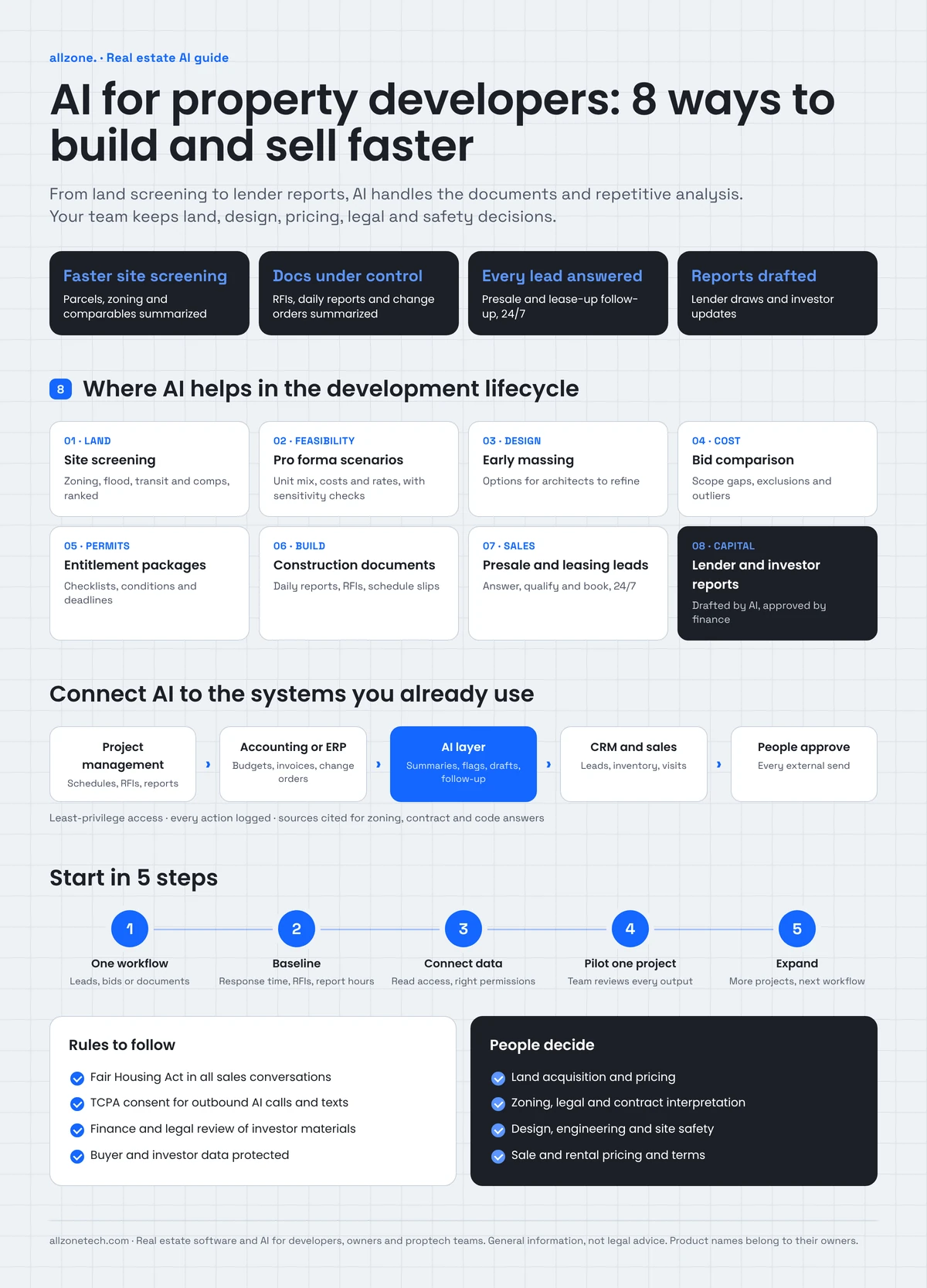
AI for property developers helps with that work. It screens sites faster, drafts feasibility scenarios, compares bids, summarizes construction documents, follows up every buyer or renter lead and prepares investor reports, while your team makes the calls that need judgment and accountability.
This guide covers where AI helps across the development lifecycle and what should stay with people. It also explains how AI connects to your existing systems and how to start with one high-value workflow.
Quick answer: Property developers use AI to screen land and zoning data, draft feasibility scenarios, generate early design options, compare bids, summarize construction documents, follow up presale and leasing leads, and prepare lender and investor reports. The best results come from starting with one workflow, connecting AI to existing project, accounting and CRM systems, and keeping people responsible for every decision.
Key takeaways
- AI is most useful where developers handle lots of documents and repetitive analysis: site screening, bids, RFIs, reports and sales follow-up.
- Land, design, pricing, legal and safety decisions stay with your team and advisors.
- Presales and leasing lead follow-up is often the fastest win, because missed leads are lost revenue.
- AI needs access to your data. Connect it to your project management, accounting, CRM and document systems instead of adding another silo.
- Start with one project and one workflow, measure, then expand.
What does AI for property developers mean?
Property development runs through a long chain of stages, each with its own data and teams. AI can help at almost every stage:
| Stage | Where AI helps |
|---|---|
| Land and site selection | Screens parcels, zoning, comparable sales and local data |
| Feasibility | Drafts pro forma scenarios and sensitivity checks |
| Design | Generates early massing and unit-mix options for architects to refine |
| Cost and procurement | Compares bids, flags scope gaps and tracks price changes |
| Permits and entitlements | Prepares document packages and tracks status and conditions |
| Construction | Summarizes daily reports, RFIs, submittals and schedule changes |
| Sales and leasing | Answers buyer and renter inquiries, qualifies leads and books visits |
| Lender and investor reporting | Prepares draw packages and monthly reports from project data |
| Handover and warranty | Answers owner questions and sorts warranty requests |
You don't need AI at every stage. Most developers start where the delay or lost revenue is easiest to see.
Where developers lose time and money
- Slow site screening. Analysts pull zoning, parcel and market data by hand for each site, so good deals go to faster buyers.
- Feasibility rework. Every change in land price, unit mix, construction cost or interest rate means rebuilding the model.
- Bid comparison by spreadsheet. Bids arrive in different formats, with different exclusions, and scope gaps are easy to miss.
- Document overload in construction. RFIs, submittals, change orders and daily reports pile up, and important issues get buried.
- Missed sales leads. Inquiries from listing sites, ads and the sales center arrive at all hours, and slow replies lose buyers and renters.
- Manual reporting. Lender draws and investor updates take days of gathering numbers from several systems.
8 ways AI helps property developers
1. Screen land and sites faster
AI can pull parcel, zoning, flood zone, transit, school and comparable sales data for each site, and summarize what you can build and the main risks. It can rank a long list of sites against your criteria, so analysts spend their time on the best few.
Zoning rules are complex and change often. Treat AI summaries as a starting point, and have your land use attorney or planner confirm anything you rely on.
2. Draft feasibility scenarios
AI can take your pro forma template and run scenarios: different unit mixes, rents or sale prices, construction costs, financing terms and timelines. It can show which assumptions move returns most and explain the results in plain language.
Your development and finance team still owns the model and the assumptions. AI speeds up the "what if" work; it doesn't decide whether a deal makes sense.
3. Explore early design options
Generative design tools, such as TestFit and Autodesk Forma, can produce massing, parking and unit-mix options that fit a site and its zoning in minutes. Developers use them to test yield and layout before paying for full design.
Architects and engineers refine the chosen option and remain responsible for the design, codes and safety.
4. Compare bids and track costs
AI can read bids in different formats, line them up against your scope, flag exclusions and gaps, and highlight prices that are far from your estimate or past projects. During construction, it can compare invoices and change orders with the budget and flag overruns early.
5. Prepare permit and entitlement packages
AI can help assemble application packages, check them against the jurisdiction's published checklist, and track comments, conditions and deadlines. When your team asks a question about a code or ordinance, a retrieval-based assistant can answer from the official text and show the section it used.
6. Keep construction documents under control
On an active site, AI can:
- summarize daily reports and highlight safety issues, delays and weather impacts
- draft RFI responses for the team to review, and track open RFIs and submittals
- compare the schedule with progress reported on site, and flag slipping activities
- summarize change orders and their effect on cost and schedule
- answer questions about contracts and specifications, with the clause shown
Site safety and quality decisions stay with your superintendent, engineers and inspectors.
7. Follow up every presale and leasing lead
For many developers, this is the fastest return. A sales and leasing assistant answers calls, texts, chats and emails at any hour. It shares availability, floor plans and pricing from your inventory, qualifies buyers or renters, books sales center visits or tours, and logs every conversation in your CRM.
Your sales team takes over when a lead is ready, or when someone asks about pricing exceptions, contract terms or anything sensitive. We explain this approach in our guide to AI real estate lead follow-up, and for completed rental communities in our guide to AI for property management.
Free AI opportunity review for developers
Tell us about your current projects. In a 30-minute call, we'll pick the workflow where AI would save the most time or win the most sales and outline a pilot on one project. See our real estate software services
8. Prepare lender and investor reports
AI can gather data from your accounting, project management and sales systems to draft draw requests and monthly investor updates: budget against actuals, schedule status, sales or leasing progress, and key risks. Your finance team reviews and signs off before anything goes out.
What should stay with people
- Land acquisition and pricing decisions
- Zoning, legal and contract interpretation, with your attorneys and planners
- Design, engineering and code compliance, with licensed professionals
- Site safety and quality
- Sale and rental pricing, incentives and contract terms
- Anything sent to lenders, investors or regulators, which should be reviewed and approved
How AI connects to your existing systems
Developers often use a mix of tools: project management software such as Procore, construction accounting or ERP systems, a sales CRM, document storage and spreadsheets. AI should connect them, not become another place to check.
| System | What AI reads | What AI writes |
|---|---|---|
| Project management | Schedules, RFIs, submittals, daily reports | Summaries, flags, draft responses |
| Accounting or ERP | Budgets, commitments, invoices, change orders | Variance reports, draft draw packages |
| CRM and sales | Leads, inventory, pricing, contracts | Conversation logs, lead scores, appointments |
| Document storage | Contracts, specifications, permits, drawings | Nothing; read only, with sources cited |
| Market and parcel data | Zoning, comparables, demographics | Site summaries and rankings |
Each AI service should get only the access its job needs, and every action should be logged. Our guides on how to integrate AI into existing systems and AI ERP integration explain the options.
Rules to keep in mind
- Fair housing. Marketing and sales conversations for residential projects must follow the Fair Housing Act and state and local rules. AI assistants should give every prospect the same information and never steer anyone toward or away from homes.
- Calling and texting consent. Outbound AI calls and automated texts to leads need proper consent under the Telephone Consumer Protection Act, and opt-outs must be honored right away.
- Investor communications. Anything that goes to investors should be reviewed by your finance and legal teams, because offering materials can carry securities obligations.
- Data privacy. Buyer, renter and investor data must be protected, with access limited to those who need it.
Real example: AI that follows up leads and books appointments
Zonified Connect is our own AI voice CRM, and it shows how presale and leasing follow-up can work. When a new lead arrives, voice and SMS agents start a sequence based on rules the business sets. Every call and text is logged on one timeline per lead, with a summary and a lead score. Appointments are booked only after the lead confirms a specific time. Timing follows the business's own time zone, and automated contact stops when the lead reaches a set stage, so the sales team takes over at the right moment. It connects to Google and Outlook calendars, HubSpot and Twilio. Read the Zonified Connect case study.
Buy AI tools or build your own?
There are good point tools for parts of the lifecycle: site analysis platforms, generative design tools, construction management software with AI features, and sales CRMs with automation. Use them where they fit.
Custom AI makes sense when:
- your data sits in several systems that no single tool connects
- you want one view of land, projects, sales and investors across your portfolio
- you need assistants that follow your own processes, templates and approval rules
- you're building a product for buyers, renters or investors, such as a portal or app
- you need control over where data is stored and how AI behaves
Many developers combine both: point tools for specialist tasks, and a custom layer that connects them. Our real estate software development services cover both.
How to start with AI as a property developer
- Pick one workflow with a clear cost. Presale lead follow-up, bid comparison or construction document summaries are common first choices.
- Measure a baseline. For sales, track response time, appointments and conversion. For construction, track RFI turnaround and report preparation time.
- Connect the data. Give AI read access to the systems the workflow needs, with the right permissions.
- Pilot on one project. Have your team review every AI output for the first weeks.
- Expand. Add projects, then the next workflow, once the results hold.
Common mistakes developers make with AI
- Buying tools before choosing a problem. Start with the workflow that costs you the most time or revenue, then pick the tool.
- Trusting AI summaries without checking. Zoning, contract and code summaries can be wrong or out of date. Always confirm the source.
- Adding another silo. An AI tool that doesn't connect to your project, accounting or CRM systems creates more copy and paste, not less.
- Automating sales conversations without rules. AI assistants need clear limits on pricing, incentives and contract questions, plus fair housing and consent rules.
- Skipping the baseline. Without "before" numbers, you can't show lenders, investors or your own team what AI changed.
- Rolling out across every project at once. Pilot on one project, learn, then scale.
Questions to ask an AI development partner
- Which of our workflows would you automate first, and why?
- How will AI connect to our project management, accounting and CRM systems?
- How do you make sure AI answers come from our documents, with sources shown?
- What will people still approve, and how is that enforced?
- How do you handle fair housing, calling consent and data privacy?
- Who owns the code, data and models when the project ends?
- How will we measure results, and what happens if a pilot doesn't work?
What to measure
| Metric | What it shows |
|---|---|
| Lead response time | How quickly buyers and renters hear back |
| Appointments per 100 leads | Whether conversations turn into visits |
| Lead-to-contract rate | Whether follow-up improves sales |
| Site screening time | How fast you can evaluate new land |
| Bid comparison time | Time saved in procurement |
| RFI turnaround | How fast construction questions are answered |
| Report preparation time | Hours saved on draws and investor updates |
What does AI for property developers cost?
Cost depends on the workflows you choose, the number of systems AI connects to, data quality, the volume of calls, messages and documents, and how much you customize. Running costs grow with usage. Starting with one workflow on one project keeps the first investment focused and the results easy to measure. Our AI development cost guide explains the main price drivers.
Illustrative example: a mid-size multifamily developer
A mid-size developer has three multifamily projects under construction and one in lease-up. Leads from listing sites and ads arrive at all hours, but the leasing team works office hours. The construction team spends hours each week summarizing daily reports for owners.
The developer starts with two workflows:
- Lease-up lead follow-up: an assistant answers inquiries 24/7, shares availability and pricing from the leasing system, books tours and logs every conversation in the CRM.
- Construction reporting: AI summarizes daily reports and open RFIs into a weekly owner update, which the project manager reviews before sending.
After a pilot, the team compares lead response time, tours booked and report preparation time with its baseline before adding bid comparison on the next project.
Ready to put AI to work on your next project?
Tell us where your team loses the most time, whether that's site screening, construction documents, sales follow-up or reporting. We'll map the workflow, connect AI to your systems and plan a pilot on one project.
Explore our real estate software development services or talk to our team.